

Key takeaways (3)
- Make a voice call to a travel desk, then ask a second agent to build one from your brief.
- Choose a flight record and its arrival time before deciding which weather forecast answers the traveller’s question.
- Repeat an ambiguous flight request with labelled classroom data, then compare tool calls before and after a repair.
This workshop is planned for three hours and includes two voice calls. First, you’ll be a traveler asking a desk for advice. Later, you’ll be a developer asking a factory agent to build a new travel desk. You’ll run the resulting agent and call it yourself.
Ready to open your workspace? Jump to the Codespaces setup. If you’re working independently, leave this page open while GitHub prepares it.
Which forecast belongs to my flight?
“I’m flying from Oslo to Bergen tonight. Will I need a coat when I land?”
Imagine the agent replies, “It’s 9 °C in Bergen.” Before you decide whether to take a coat, what would you ask it to show you?
Inspect the answer
Ask for the flight’s arrival time and the hour covered by the forecast. If the plane lands tomorrow morning, a correct reading for tonight can still give poor packing advice. In Inspector you can compare the arrival from one tool call with the timestamp passed to the next.
Keep that question handy. You will first call a desk with weather and currency tools, then build a desk that can look up the flight for itself.
Tomorrow the travel team asks for a change
“When two records match my flight number, ask which date I mean before giving me the weather.”
As the developer, how would you know the change worked? You’d want to hear the desk ask for the date, see which record it selected after your answer, and check that a traveler with one clear match still gets a forecast directly.
That is the job of the software factory in this tutorial. A builder proposes a travel skill from your brief. You review the proposal, approve the saved version, and compile it with the selected tools into a separate Mantle project. Then you call that project to check its behavior. Because the software it produces is itself an agent, we call this an agent factory.
What runs where?
| Technology | Its job in your two calls |
|---|---|
| Rasa Mantle and Deepgram | Mantle runs the conversations and selects tools. Deepgram transcribes your speech and speaks each agent’s replies. |
| Codex | In the workbench exercise, Codex authors a candidate specification and helps you refine the travel skill. |
| OpenAI hosted Agents API | In the factory exercise, Studio submits your spoken brief to a hosted build session and retrieves the proposed specification. |
| Avinor, Open-Meteo and Frankfurter | The traveler agent reads flight boards, forecasts and reference exchange rates. No participant travel-data key is required. |
| GitHub Codespaces | Your browser workspace contains the project files, terminal and prepared runtimes. |
Your route through the masterclass
| Elapsed minutes | Open | What you finish with |
|---|---|---|
| 0–30 | Your first travel briefing | A provider result and a two-turn voice call with the starter desk |
| 30–75 | Build the full agent with Codex | A separate four-tool Mantle project you can run |
| 75–85 | Break | Save the candidate path and your agent directory |
| 85–135 | Operate the Mantle factory | A proposed agent specification, hosted session ID when live, and a reviewed build |
| 135–180 | Test a complete trip and take it home | A flight briefing with attributable sources and a next build |
Presenting? Open the slide PDF and instructor card. Working alone? Each chapter ends with an observable checkpoint.
Before you start
You need a GitHub account with Codespaces access, a browser, a microphone, speakers or headphones, and the credentials below. A Codespace is your own temporary computer on GitHub. Its editor and terminal open in your browser. Your microphone and speakers stay on your device.
A. Get the three values for the complete workshop
If the workshop host gave you a value, use it in the matching row. One Deepgram key serves both agents and both directions of audio. The Rasa value is a license. GitHub itself needs only your sign-in.
| Exact GitHub secret name | Where to get the value | What it unlocks |
|---|---|---|
RASA_LICENSE | Open the Rasa Developer Edition form, submit it and copy the full license string delivered to you. | Training and running the Mantle factory and traveler agents. |
OPENAI_API_KEY | Open OpenAI project API keys, select the intended project, choose Create new secret key, name it and copy the value when shown. Use a project with billing and access to the configured models. | Mantle conversations, Codex API-key login, and hosted builds. The hosted exercise also needs Agents read/write and Responses write permissions. |
DEEPGRAM_API_KEY | Open the Deepgram Console, choose your project at the top left, then Settings → API Keys → Create a New API Key. Name it, choose a role that permits speech requests, create it and copy the secret while visible. Your project needs speech usage available. | Flux transcribes the user’s speech. Aura-2 speaks the reply. Both the developer and the traveler use this key. |
Avinor supplies public airport boards. The flight exercise covers Oslo and Bergen in either direction. The weather tool uses Open-Meteo and the currency tool uses Frankfurter. The workshop endpoints require no additional participant keys. The Avinor feed documentation describes the board and its update interval. The server reuses each board for three minutes within the running agent.
B. Put the values in your personal GitHub settings
- Open two browser tabs. Keep this guide open. In the other tab, sign in to GitHub with the account you will use for the workshop.
- Click your profile picture at the top right, choose Settings, then choose Codespaces in the left sidebar. You can also open that exact settings page.
- Scroll to Codespaces secrets and click New secret. Think of a secret as a label paired with a hidden value.
- Try the first one together. In Name, type
RASA_LICENSE. In Value, paste the license string. Under Repository access, select RasaHQ/rasa-community-resources. Click Add secret. - Repeat step 4 for
OPENAI_API_KEYandDEEPGRAM_API_KEY. Use each provider’s value in its own row. Confirm the names appear in the list. GitHub hides the saved values. - If a name already exists, edit its repository access to include the workshop. If the repository is absent from the picker, enter the value in the matching recommended secret field on the creation form in step C instead. For a fork, grant access to the fork you actually open.
C. Create your first Codespace
- On the form check the repository RasaHQ/rasa-community-resources, configuration Rasa Travel Agent Factory, and a machine with at least four cores. Check which account will pay for Codespaces usage. For an unmerged edition, use the review branch supplied by the host and choose Code → Codespaces → New with options.
- Click Create codespace once. A browser editor opens. Leave it open while the preparation log runs. Wait for Travel factory dependencies ready before starting Mantle.
- In the editor’s top menu, select Terminal → New Terminal. If the menu is collapsed, open ☰ first. The panel at the bottom is where you type commands. Paste the line below and press Enter.
bash desk doctorWhat you should see: three secret names followed by present, the Mantle and builder executables marked ready, and a Codex executable path. This checks availability inside the workspace. The voice exercise below tests the microphone, speech services and speaker together.
If a secret says missing: return to step B, correct the name or repository access, then open Your Codespaces. Find this workspace, choose … → Stop codespace, wait for it to stop, then click its name to reopen it. Open a terminal and rerun bash desk doctor. Your existing project stays in place.
D. Get a useful answer
In the browser editor choose Terminal → New Terminal. The terminal starts in workshops/software-factories-masterclass. Paste one command and press Enter:
bash desk data fx USD GBP 200Find converted and reference_date. You can already tell a traveler approximately what $200 is worth in pounds and which day’s rate you used. Try bash desk data weather LHR next. For flights, run bash desk data flights OSL BGO and use a returned flight number in bash desk data status FLIGHT_NUMBER. If a source is unavailable, keep that result and try the other one.
How the two agents fit together
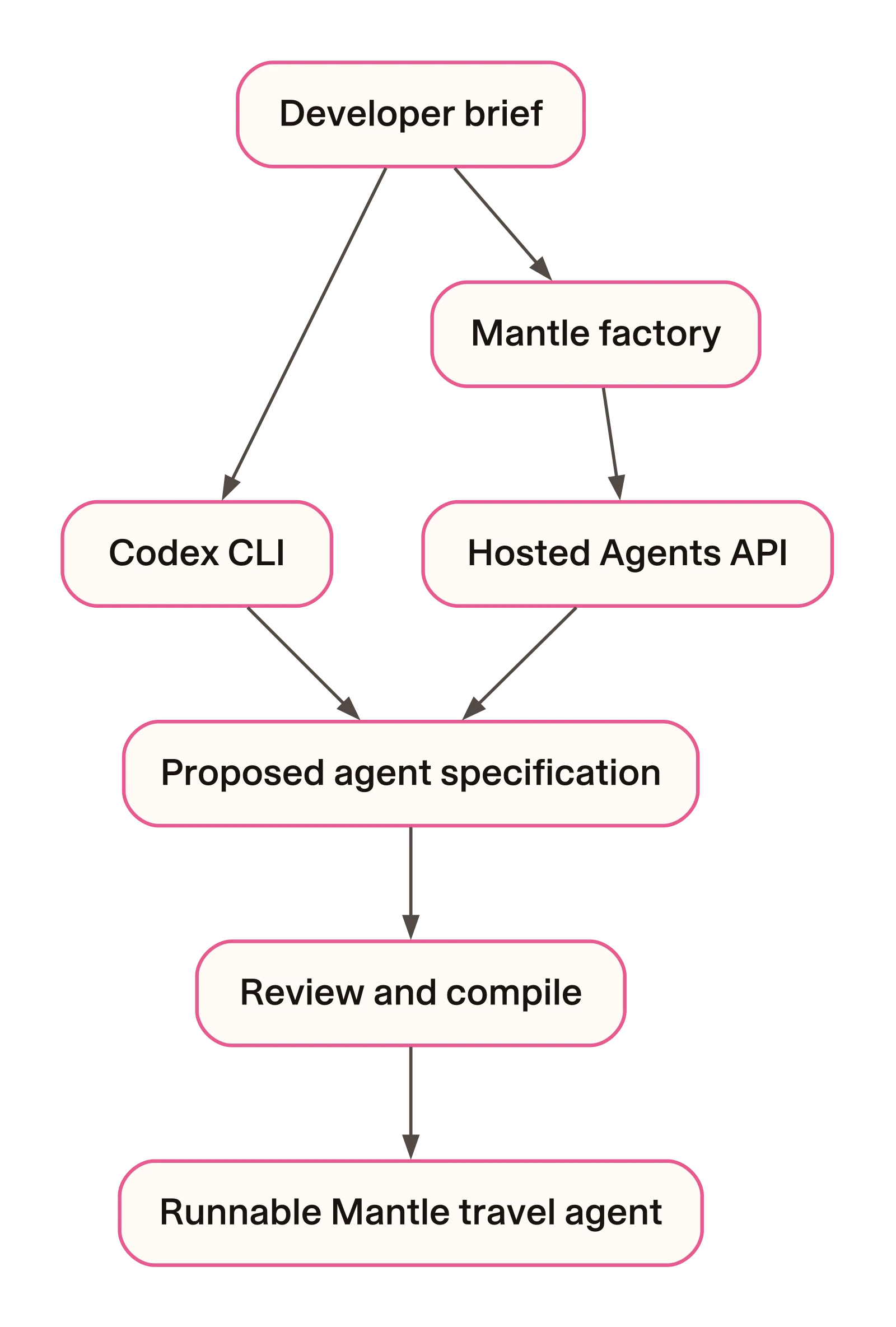
The developer builds the product. The traveler uses it to call providers.
The build inputs are specifications. The output is a real agent directory you can open, edit, train and run. The live readers are reusable tools authored in the repository. Your builder decides how the travel skill should use them.