

Guide · AI product engineer
How to replace skill-level requires in Rasa
If a Rasa upgrade rejects the requires line in a skill, move the check into a precondition and delete any instruction that repeats it.
8 → 0
logged-in runs of 10 where the model went back to login: line kept → deleted
2 → 0
logged-in runs of 10 where the agent asked for the PIN again: line kept → deleted
10 of 10
logged-in runs where the booking-change skill started, with or without the line
Key takeaways (3)
- Replace the requires line with a named precondition, and define that condition once in the agent file.
- Delete skill instructions that repeat the check. In our runs, one sent the model back to login for logged-in users.
- Do not use the hidden setting as a login gate. It has no condition and hides the skill from everyone.
You upgraded a Rasa project, and now it fails validation on a skill that
used to load. A skill that guards itself with a requires: line stops with
this error. These are the last three lines of the output, unedited:
rasa.exceptions.ValidationError: Project validation found 2 problem(s):
  - [mantle.validation.skill.failed_to_load] Skill directory 'skills/change_booking' failed to load and would be silently skipped: Skill-level requires is no longer supported. Use precondition to park the skill until a resolver runs, or hidden: true to omit it from routing. Tool-level requires under tool_constraints is unchanged.. Fix the skill so it parses, or remove it.
  - [skill.referenced.invalid_target] Skill 'flight_status' references external call/link target 'change_booking', which does not resolve to a skill or flow in the catalog.
The fix is to turn the requires: line into a precondition: a named
condition on the skill, defined once in agent.yml. Then delete any line in
the skill’s instructions that repeats the same check.
That second step is easy to miss, because the error does not mention it. Our
sample travel agent had the login check in two places. One was the
requires: line. The other was an instruction in the skill’s text: “First
verify identity: @skill.authenticate”. We moved the first into a precondition
and left the second alone.
After the traveller had logged in, the model went back to the login skill in 8 of 10 runs, and in 2 of them the agent asked for the PIN again. With only that one instruction deleted, both happened in 0 of 10 runs. This is run 1 with the instruction kept, recorded on 29 September 2026:
user: Hi, I would like to verify my identity first. My PIN is 4242.
tool: activate {"target_id": "intro"} -> activate: done
bot:  Hi Maya. I’m Atlas, the Horizon Travel voice assistant.

      I can help you check your itinerary, get flight status, change or cancel a booking, report lost baggage, or answer common travel FAQs.

      What would you like to do today?
tool: activate {"target_id": "authenticate"} -> activate: done
tool: verify_traveler_pin {"pin": "4242"} -> {"ok": true, "authenticated": true, "display_name": "Maya Chen", "hint": "PIN accepted."}
bot:  I was starting to introduce what I can help with at Horizon Travel.
      Do you want me to continue, or should I stop?
user: Skip it, thanks.
bot:  Is there anything else you need help with?
user: I want to change the date of my Lisbon booking.
tool: activate {"target_id": "change_booking"} -> activate: done
tool: activate {"target_id": "authenticate"} -> activate: done
bot:  Sure, I can help change your Lisbon booking.

      Before I make any changes, please tell me your four-digit Horizon Travel PIN.
That is every user and bot message from the saved conversation, unedited, with line breaks indented. The tool lines are trimmed: only the PIN check and the skill activations are shown. That matters if your users must not be asked to log in twice.
Why the requires line stopped working
In Rasa’s agent runtime, Mantle, a skill is a folder with a skill.md file.
The file starts with settings, called frontmatter, then gives the model its
instructions in plain text. A skill-level requires: line sat in that
frontmatter and named a condition, such as “the traveller is logged in”.
In the 3.21.0.dev1 source, that condition decided which skills the model
could choose. While it was false, the engine left the skill off the model’s
list. On 3.21.0.dev3, Rasa rejects any skill-level requires: line, whatever
its value. requires: lines on individual tools, under tool_constraints,
still work, as the error says.
Show the dev3 code that rejects the line
This excerpt is the function from
rasa/mantle/skills/markdown_skill_compiler.py in the rasa-pro 3.21.0.dev3
wheel, lines 925 to 937. It checks only whether the key is present, so no
value gets through:
def _reject_skill_level_requires(frontmatter: Dict[str, Any]) -> None:
    """Fail closed when skill.md still declares a skill-level ``requires``."""
    if REQUIRES_FIELD not in frontmatter:
        return
    raise ValidationError(
        code=_SKILL_LEVEL_REQUIRES_REMOVED_CODE,
        event_info=(
            "Skill-level requires is no longer supported. Use precondition to "
            "park the skill until a resolver runs, or hidden: true to omit it "
            "from routing. Tool-level requires under tool_constraints is "
            "unchanged."
        ),
    )
The check has moved to the moment a skill starts. Here is how the new precondition works when the model picks a gated skill:
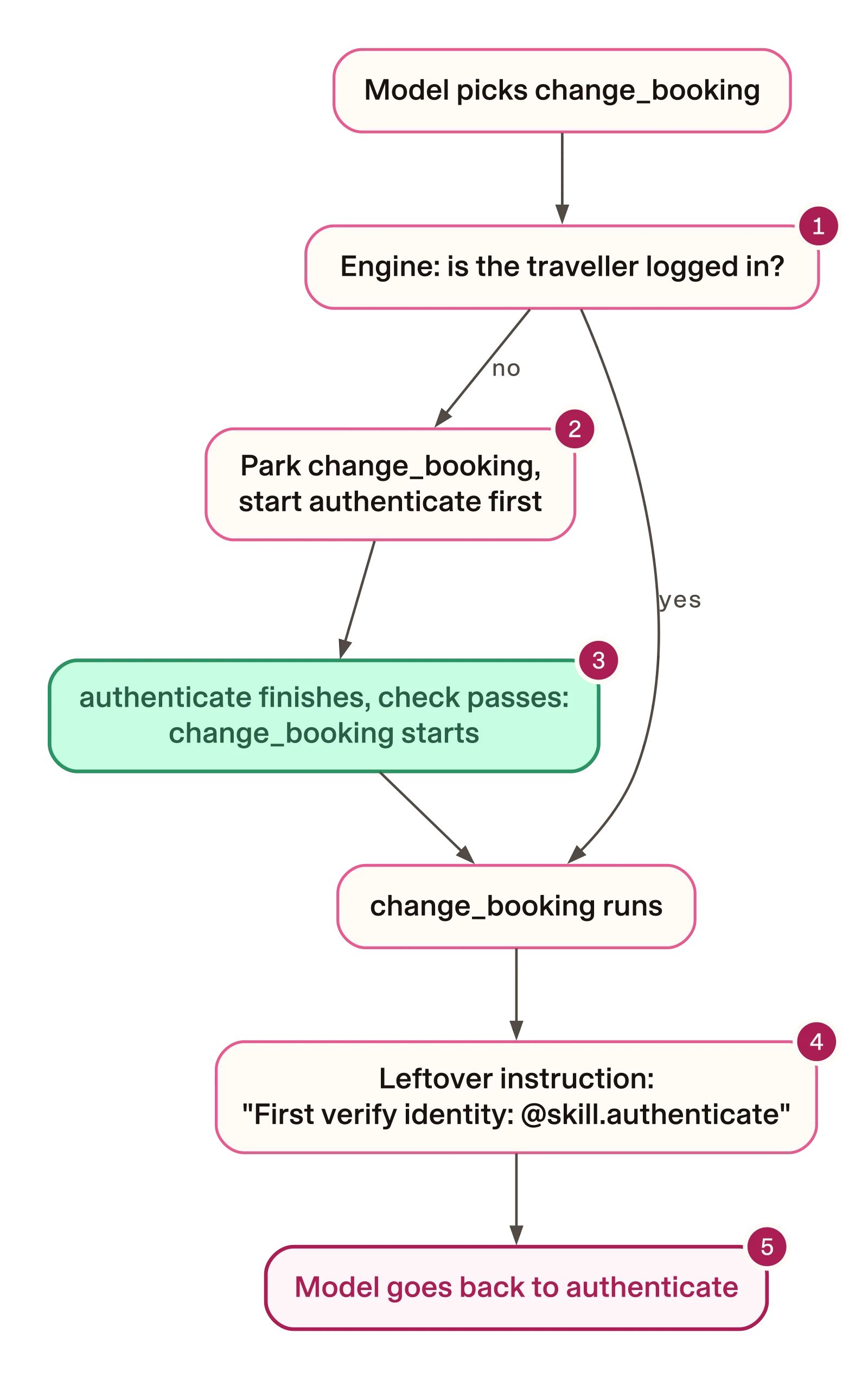
- The engine checks the condition you bind in
agent.ymlwhen the skill starts. - If the check fails, the skill waits while the login skill runs.
- When login succeeds, the waiting skill starts.
- The leftover instruction is a second copy of the same check, written for the model.
- In 8 of 10 logged-in runs, the model went back to
authenticateafter the engine’s check had passed.
The two copies sit on different paths. In the logged-in runs, the engine’s
check had already passed: change_booking started in 10 of 10. The model then
activated authenticate in 8 of them, and deleting the instruction took that
to 0 of 10. A check moved from a prompt into code is only half-moved while the
prompt still states it.
The error also says the skill “would be silently skipped”. On dev3 it was not
silent: rasa train logged the error, exited with status 1 and wrote no
model. We did not test serving a model trained on an older build.
How to replace the requires line
Do this in your own project, for each skill that has a skill-level
requires: line. The commands below search a folder named skills, as in
the sample. Change the folder name if yours differs.
Find every line to change
From your project folder, list the skill-level requires: lines. They start
at the beginning of a line in the frontmatter. Tool-level requires: lines
are indented under tool_constraints, so this search skips them:
- Any system
git grep -n '^requires:' -- skills
In the sample at commit 01d6a6e, there was one match:
$ git grep -n '^requires:' 01d6a6e -- examples/mantle-voice-agent/skills
01d6a6e:examples/mantle-voice-agent/skills/change_booking/skill.md:6:requires: session.project.authenticated
Then find the instructions that repeat each check. In the sample, the
instruction repeated the check by naming the login skill, authenticate, so
search for that mention. Replace authenticate with the name of your own
login skill:
- Any system
git grep -n '@skill.authenticate' -- skills
In the sample there was one match, in the same skill:
$ git grep -n '@skill.authenticate' 01d6a6e -- examples/mantle-voice-agent/skills
01d6a6e:examples/mantle-voice-agent/skills/change_booking/skill.md:19:First verify identity: @skill.authenticate
Read each match before you delete it. Delete only the lines that repeat the gate.
Replace the line with a precondition
In the skill’s frontmatter, replace the requires: line with
precondition: and a name. The value is now a name, not a condition. This
is the frontmatter of skills/change_booking/skill.md in our fixed copy.
Only the precondition: line differs from the sample:
---
name: change_booking
description: >
  Change or cancel an existing Horizon Travel booking.
  Activate for date changes, cancellations, or "I need to change my trip".
precondition: authenticated
tool_constraints:
  - cancel_booking:
      requires: session.project.selected_booking_ref
      requires_confirmation:
        enabled: true
        utter_for_confirmation: utter_confirm_cancel_booking
        utter_on_user_denial: utter_cancel_aborted
      on_success: utter_booking_cancelled
---
The tool-level requires: line on cancel_booking stays as it is.
Define the condition in agent.yml
Add an orchestrator: block at the top level of agent.yml, beside agent:,
not inside it. This excerpt is the block we added. Our copy also added six
comment lines above it that explain the block; nothing else in the file
changed:
orchestrator:
  preconditions:
    authenticated:
      satisfied_when: session.project.authenticated
resolve_with: authenticate- The name must match the skill’s
precondition:line. Without this entry, validation fails withmissing_binding. - The condition from the old
requires:line, unchanged. In the sample,authenticatedis project-wide memory, and the PIN check tool sets it when the PIN matches. - The skill the engine starts first when the condition is false.
Delete the instruction that repeats the check
Delete the line the second search found, and the blank line after it. This
is the whole difference between the two copies we tested. The diff is trimmed:
the diff command line above the file names is left out:
--- w5/pre/skills/change_booking/skill.md	2026-09-29 11:44:54
+++ w5/pre19/skills/change_booking/skill.md	2026-09-29 12:54:26
@@ -16,8 +16,6 @@

 Help the traveler change or cancel a booking.

-First verify identity: @skill.authenticate
-
 Then find the booking: @skill.find_booking

 Ask what they want to change.
Deleting it did not weaken the gate. Before login, the engine still parked
change_booking, ran authenticate first and started change_booking after
the PIN, in 3 of 3 runs.
Why not use hidden: true
The error offers a second option: hidden: true. It looks shorter, but it is
not a login gate, for two reasons.
First, it can fail validation on a skill you did not touch. In the sample,
another skill, flight_status, offers a booking change by naming
@skill.change_booking in its text. With hidden: true, validation stopped
on that mention. This is the problem line, unedited:
- [skill.prose.hidden_skill_reference] Skill 'flight_status' references hidden skill 'change_booking' via '@skill.change_booking' in prose. Hidden skills cannot be started from routing; use a deterministic call: or link: step, or bind the skill as resolve_with in agent.yml orchestrator.preconditions.The message names three ways round it. We tested none of them.
Second, hidden: true has no condition. In the dev3 source, the engine
leaves a hidden skill off the model’s list for every user. We tested a copy
with the two mentions rewritten as plain text, so that it validated. In 3 of
3 runs, a traveller who had just given the right PIN asked to change a
booking, and change_booking never started.
How to check the fix
Validate the project
From your project folder, run Rasa’s project validation. This command uses uv and the project’s lock file, and makes no model calls:
uv run --locked python -c "from pathlib import Path; from rasa.mantle.validation import validate_project; validate_project(Path('.')); print('validate_project: ok')"We ran it on four copies of the sample on 3.21.0.dev3:
| What the skill and agent.yml declare | Result |
|---|---|
The old requires: line | Fails: the skill does not load, so a mention of it breaks |
hidden: true | Fails: another skill mentions the hidden one in its text |
precondition: authenticated, no entry in agent.yml | Fails: missing_binding |
precondition: authenticated, bound in agent.yml | Passes: prints validate_project: ok |
With the old line, one leftover key gave two errors. The second one names
flight_status, because change_booking never loaded. Fix the skill that
fails to load first, and the second error goes away.
A pass means the files load and the names match. It says nothing about a conversation, so test one next.
Test a conversation where the user logs in first
Train a model, then start your agent with its REST API on, as our test script did. This test calls your model provider with your key:
uv run rasa train
uv run rasa run --enable-api --port 5005
In a second terminal, send the same turns our runs used, through the same REST endpoints our test script used. The sender ID names the conversation; change it for each run:
for msg in "Hi, I would like to verify my identity first. My PIN is 4242." "Skip it, thanks." "I want to change the date of my Lisbon booking."; do
  curl -s -X POST http://localhost:5005/webhooks/rest/webhook -H 'Content-Type: application/json' -d "{\"sender\": \"login-test-1\", \"message\": \"$msg\"}"
done
curl -s -o tracker.json 'http://localhost:5005/conversations/login-test-1/tracker?include_events=ALL'
Use your own agent’s PIN or login turn and your own gated request. Our script made the same requests from Python; we did not run this curl form itself.
The tracker request works without a token only when the server has no auth
token or JWT secret. If you start Rasa with --auth-token, set RASA_TOKEN
to your token. Add ?token=$RASA_TOKEN to the webhook URL, as Rasa’s own
console client does. The tracker URL already has a query string, so add
&token=$RASA_TOKEN. For example, for the second turn and the tracker:
curl -s -X POST "http://localhost:5005/webhooks/rest/webhook?token=$RASA_TOKEN" -H 'Content-Type: application/json' -d '{"sender": "login-test-1", "message": "Skip it, thanks."}'
curl -s -o tracker.json "http://localhost:5005/conversations/login-test-1/tracker?include_events=ALL&token=$RASA_TOKEN"
If you try this on the sample as shipped at 01d6a6e, the served model has
no demo data, so the PIN check returns customer_not_found. Our copies
changed lib/database.py to read the project folder from an
ATLAS_PROJECT_ROOT variable, so the served agent could find the data.
Then list which skills started, finished or resumed:
jq -r '.events[] | select(.event | IN("skill_activated", "skill_completed", "skill_resumed")) | "\(.event) \(.skill_id)"' tracker.jsonThis is the output for run 1 of each copy, from the saved conversations.
Temperature 0 did not make the runs repeat exactly: with the instruction kept,
the model went to authenticate in eight runs and to find_booking in two.
So 8 of 10 is a rate over ten runs. Pick the copy to compare:
Instruction kept
authenticate starts again after change_booking. In seven of the eight
runs that went back to login, this line read skill_activated; in run 4 it
read skill_resumed:
skill_activated default_session_start
skill_completed default_session_start
skill_activated intro
skill_activated authenticate
skill_completed authenticate
skill_activated default_continue_interrupted
skill_completed default_continue_interrupted
skill_activated default_completed
skill_activated change_booking
skill_activated authenticate
Instruction deleted
find_booking starts after change_booking:
skill_activated default_session_start
skill_completed default_session_start
skill_activated intro
skill_activated authenticate
skill_completed authenticate
skill_activated default_continue_interrupted
skill_completed default_continue_interrupted
skill_activated default_completed
skill_activated change_booking
skill_activated find_booking
Look at the lines after your gated skill starts. If your login skill appears there for a user who is already logged in, search for a leftover instruction.
Test the path before login too
Repeat the test with the change request first and the PIN later. Our runs sent “I want to change the date of my existing booking, please.”, “The Lisbon one.”, “4242” and “Move it to next Friday, please.”. With the instruction deleted, the end of the list showed the gate working. These are the last three lines of run 1, trimmed:
skill_resumed authenticate
skill_completed authenticate
skill_activated change_booking
change_booking started only after authenticate finished.
Trade-offs
A precondition gates one skill, not the data. It decides when a skill can
start. It does not protect other skills. Before login, in all six
precondition runs, find_booking listed the traveller’s bookings before any
PIN. If other skills read private data, gate them too, or check inside their
tools.
Keep the checks on tools that change things. In the sample,
cancel_booking keeps its own tool-level requires: line and a confirmation
step. That line checks that a booking has been selected, not that the
traveller logged in. Treat the precondition as deciding when a conversation starts, and keep
the check that protects the booking on the tool.
A failed login drops the parked skill. We did not see this in a run. In the dev3 source, if the login skill finishes and the condition is still false, the engine drops the parked skill. By default it then says: “I’m sorry, I wasn’t able to continue with that request.” The sample’s login skill allows one retry, then offers a human handoff.
Limits
- After login, the live runs were ten per precondition copy and three on the hidden copy. Before login, they were three per copy. All used one agent, one model at temperature 0 and one phrasing per conversation.
- Rasa 3.21 is a prerelease, and the tests ran on 3.21.0.dev3 only.
- We did not run the old
requires:line after login on dev1. So these runs do not show whether the second login happened before the upgrade too. - No run completed a date change. The sample’s instructions say a human agent must complete paid changes, and our scripted runs ended before that point.
- Besides the gate, our copies changed the
rasa-propin to 3.21.0.dev3, with the docs and Makefile to match. They write the key asapi_key: ${OPENAI_API_KEY}, and the data loader readsATLAS_PROJECT_ROOTso the served agent finds its demo data. The hidden copy also rewrote two skill mentions as plain text.
All runs were recorded on 29 September 2026.
Deleting one line and rerunning with everything else unchanged is the same technique the guard mutation-testing guide applies to a guard’s tests.