

Guide · Conversation designer / UX specialist
What a voice agent should say before verifying the caller
Caller ID tells your voice agent which number is calling, not who is holding the phone, so plan what it says before the caller confirms.
Key takeaways (3)
- A caller ID match names a number, not a person. Offer the first name as a question and nothing more.
- Cutting a fact from the greeting does not cut it from the model if project memory still holds it.
- A tool's memory interface cannot overwrite a set project field, so keep unconfirmed matches out of project memory.
Your voice agent looks up the calling number, finds a customer and greets them by name. That works when the account holder is calling. But phones get shared, handed to children and left on desks. Caller ID tells you which number is calling, not who is holding the phone.
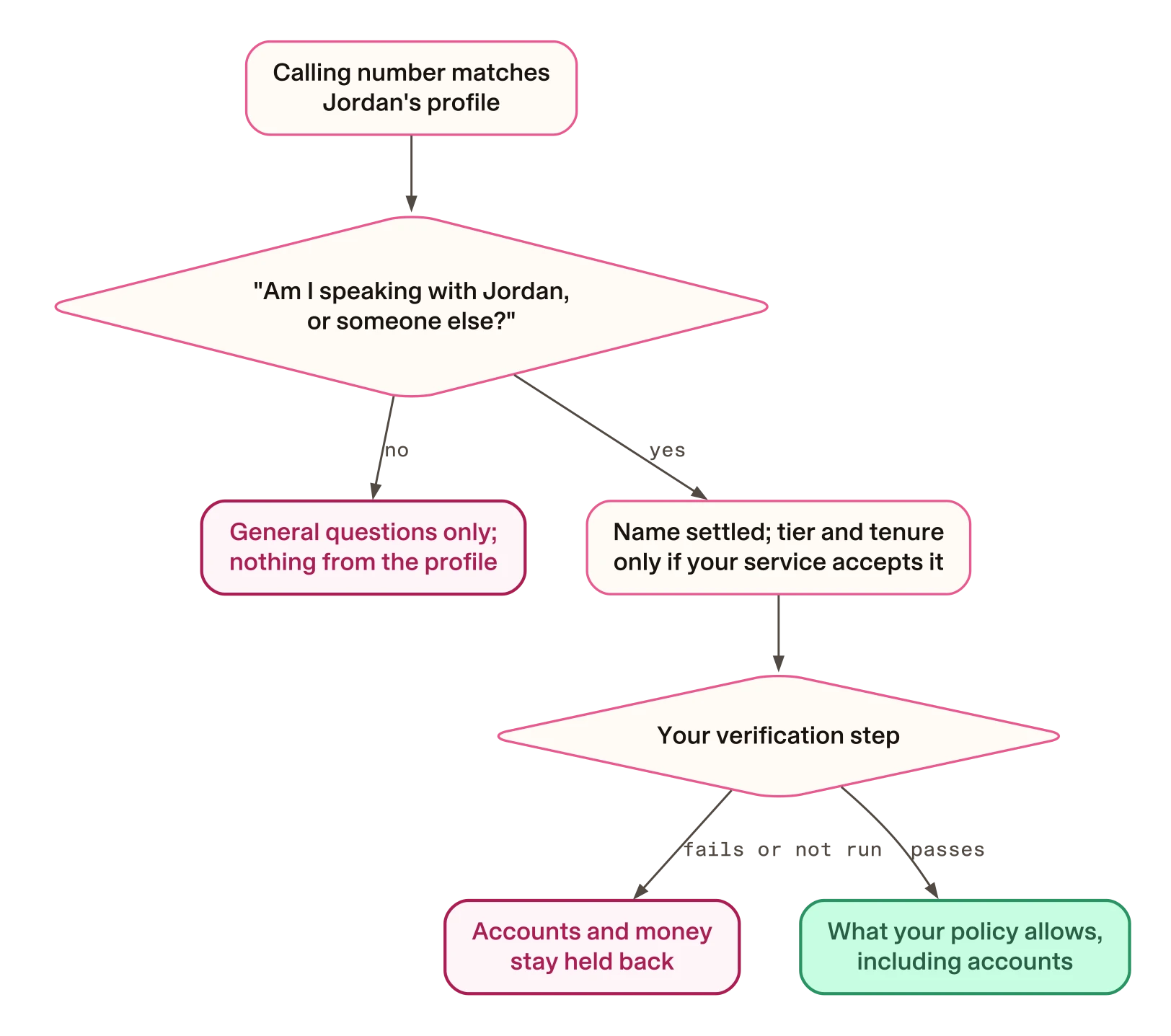
The fix is to treat the match as a guess. Offer the first name as a question. Say nothing else from the profile until the caller confirms. Keep the unconfirmed profile out of the agent’s long-lived memory. That matters if your agent can read out account details, because a wrong match then tells a stranger about someone else’s money.
The last part is the one that is easy to miss. We ran the profile lookup from
Rasa’s session-start personalisation pattern against Rasa’s own memory code.
We set up the memory objects by hand, with no server, model bootstrap or
model. Then we rendered the Project Memory section with Rasa’s own formatter
and template, and tried to set the name again, to None. Output trimmed:
Rasa’s debug log lines are left out.
### Project Memory
These facts are already set for this session and will remain so throughout this session.
- project.customer_name: Jordan
- project.customer_tier: Premier
- project.member_since: 2019
- project.time_of_day: morning
- project.default_account_id: acc_checking
- project.default_account_label: Everyday Checking
--- try to clear customer_name
ProjectMemoryAlreadySetError: Project memory field 'customer_name' is already set and cannot be overwritten.
Note the second line: it tells the model these facts “will remain so throughout this session”. In the Rasa Pro source, this section goes into the system prompt for routing and for the active skill.
So a shorter greeting is only half the job. If the lookup wrote the profile to
project memory, the model still sees it, labelled as settled fact. In Rasa Pro
3.21.0.dev5, a tool that writes to a set project field through
context.memory gets the error above, even when it writes None.
Why it happens
The pattern was written for a customer who has already signed in. The comment above its demo profile says a real deployment would take the customer “from the authenticated session / channel identity”. On a phone line, the channel identity is the calling number.
The session opener is a skill whose whole body is two steps. This excerpt is
from skills/default_session_start/skill.md:
:::ordered_block id=main
steps:
  - id: identify
    execute_tool: get_customer_profile
  - id: greet
    action: utter_greet
:::
identify fetches the profile and greet speaks. Nothing between them asks
whether the profile belongs to the caller. The README says the greeting fires
“before the user types anything”, so the caller cannot correct anything first.
The greeting puts the name, tier and joining year in its first two sentences.
This is the whole response file, skills/default_session_start/responses.yml,
without its comment lines:
responses:
  utter_greet:
    - text: >-
        Good {session.project.time_of_day}, {session.project.customer_name}!
        Always great to see a {session.project.customer_tier} member who's been
        with us since {session.project.member_since}. How can I help you today?
      metadata:
        rephrase: true
Here is what that can sound like. This script is illustrative: Northgate Bank and the household are made up. The agent’s lines use the pattern’s greeting, the example offer in its transactions skill and its demo transaction rows. Jordan’s teenager is returning a missed call from Jordan’s phone.
Agent: Good afternoon, Jordan! Always great to see a Premier member who’s been with us since 2019. How can I help you today?
Caller: Er, what’s gone into the account recently?
Agent: Want your usual Everyday Checking, Jordan?
Caller: Yeah.
Agent: The only money in recently is a payroll deposit of $2,150.00 on 22 July.
Nothing here is a bug. The pattern’s guards are aimed at the model inventing a name, a tier or a payment. Every fact above was real and correctly looked up. It went to the wrong listener.
Where the profile goes after the greeting
Cutting the tier from the greeting does not remove it from the model. We read the Rasa Pro source to see where profile facts end up:
| Where the fact goes | Does the model see it? |
|---|---|
| The spoken greeting | Yes, as the agent’s own turn in the conversation history |
| Project memory | Yes, in the system prompt for routing and for the active skill |
| The call that rewords the greeting | No project memory; it is told “do not add information” |
The middle row is the one that matters. Project memory holds facts that every skill in the agent can read. The pattern’s lookup tool writes six fields there, and Rasa lists them under the heading shown at the top of this page.
How to fix it
This guide recommends one approach: a number match earns a first name, asked as a question, and nothing else. The cost is one extra turn for the real customer. The first three steps are for whoever owns the words. The last is a requirement to hand to your engineer.
Decide what each stage of the call may say
Write down what the agent may say at each stage. For the sample bank, it looks like this:
| Stage of the call | May say | Holds back |
|---|---|---|
| Number matches only | Time of day, the bank’s name, the first name as a question | Tier, tenure, accounts, balances, activity |
| Caller says it is them | The name as settled; tier and tenure if your service allows | The usual account, balances, transactions |
| Your verification passes | What your policy allows | What your policy still withholds |
The third row is left open on purpose. What counts as verification is a decision for your risk and compliance owners. The guide to approving agent actions covers the evidence they should ask for.
Ask a question that makes “no” easy
A question can still assume the answer. Compare these two opening lines, both illustrative:
Assumes yes
Agent: Good afternoon. Is this Jordan?
It is a question, but “yes” is the only easy reply. Saying “no” means contradicting the agent, and a teenager who wants to hear about a payment has every reason to say “yeah”.
Invites no (recommended)
Agent: Good afternoon, you’ve reached Northgate Bank. Am I speaking with Jordan, or someone else using Jordan’s phone?
It names the other possibility, so “no” is an ordinary answer. It uses only the first name. It says nothing about the account, so a wrong match leaks nothing yet.
If the caller says “Who’s asking?” or stays silent, repeat the bank’s name and the question. Never fill the pause with a profile fact.
Write the reply for a wrong match
Here is the recovery, again illustrative:
Caller: No, it’s their son.
Agent: Thanks for telling me. I can answer general questions about Northgate Bank. For anything about an account, the account holder needs to call us themselves.
Caller: Can you just tell me if the money came in?
Agent: I’m sorry, I can’t. For anything about an account, the account holder needs to call us themselves.
Thank the caller once. Repeat nothing from the profile, not even the name. Offer only what needs no identity. Give the same answer when asked again, because the second request is the real test.
Keep the unconfirmed match out of project memory
This step is for your engineer. In the pattern, the lookup tool writes the
profile straight into project memory. This excerpt is from
skills/default_session_start/tools.py:
        context.memory.set("customer_name", _CUSTOMER_PROFILE["preferred_name"])
        context.memory.set("customer_tier", _CUSTOMER_PROFILE["tier"])
        context.memory.set("member_since", _CUSTOMER_PROFILE["member_since"])
        context.memory.set("time_of_day", time_of_day)
        context.memory.set("default_account_id", _CUSTOMER_PROFILE["default_account_id"])
        context.memory.set(
            "default_account_label", _CUSTOMER_PROFILE["default_account_label"]
)The requirement to hand over: hold the unconfirmed match somewhere it can be withdrawn, and write only confirmed facts to project memory. In your own project, that means changing the session-start tool and the greeting template. The pattern does not do this yet.
We tried the storage half in a throwaway copy of the pattern. The copy gives
the session-start skill its own private memory, which other skills cannot
read. This is the new file, skills/default_session_start/memory.yml:
schema:
  private:
    candidate_name:
      type: text
In the copy’s tools.py, these two lines replace the six project writes. The
name goes to the private field, and only the time of day goes to project
memory. This excerpt shows the two lines:
        context.memory.set("candidate_name", _CUSTOMER_PROFILE["preferred_name"])
        context.memory.set("time_of_day", time_of_day)
We ran the same kind of offline check, then cleared the name the way a “no” would. The output of that run, trimmed: debug log lines are left out.
--- after lookup, session-start skill
### Project Memory
These facts are already set for this session and will remain so throughout this session.
- project.time_of_day: morning
skill memory lines: ['default_session_start.candidate_name: Jordan']
--- after lookup, view_transactions skill
### Project Memory
These facts are already set for this session and will remain so throughout this session.
- project.time_of_day: morning
skill memory lines: []
--- caller says "no": clear candidate_name
cleared
--- after the no, session-start skill
### Project Memory
These facts are already set for this session and will remain so throughout this session.
- project.time_of_day: morning
skill memory lines: []
The name is held only by the session-start skill, and the “no” removes it. In a second run, a “yes” copied the name into project memory once. Both answers were direct memory writes, not a caller. This checks the storage only: we did not build the confirmation step or run a conversation.
The copy is not a working agent as it stands. Its greeting still reads the customer’s name, tier and joining year from project memory, and the usual-account offer still reads the usual account, but the copy no longer writes them. That is why the greeting template has to change with the tool.
How to check the fix works
First, list what your project writes into memory. Run this from the project folder:
- Any system
grep -rn 'context.memory.set' skills/
On the pattern, it printed these lines, unedited:
skills/default_session_start/tools.py:50:        context.memory.set("customer_name", _CUSTOMER_PROFILE["preferred_name"])
skills/default_session_start/tools.py:51:        context.memory.set("customer_tier", _CUSTOMER_PROFILE["tier"])
skills/default_session_start/tools.py:52:        context.memory.set("member_since", _CUSTOMER_PROFILE["member_since"])
skills/default_session_start/tools.py:53:        context.memory.set("time_of_day", time_of_day)
skills/default_session_start/tools.py:54:        context.memory.set("default_account_id", _CUSTOMER_PROFILE["default_account_id"])
skills/default_session_start/tools.py:55:        context.memory.set(
skills/view_transactions/tools.py:74:    context.memory.set("selected_account_label", account["label"])
The six session-start names are declared in the root memory.yml, so they are
project memory. The grep can miss writes made through a helper or a name built at run time, so read
memory.yml alongside it.
Then rehearse the wrong listener with a colleague, once your engineer has a build with a confirmation step. This is a proposed test, not a result we have:
| Step | What the colleague does | It passes when |
|---|---|---|
| 1 | Calls from a number linked to a test profile and answers “no” | The agent gives the general reply and no name |
| 2 | Asks about recent payments, then asks again in other words | Both replies are the general refusal, with no account name |
| 3 | A few turns later, asks something that would trigger the usual-account offer | The agent neither uses the name nor offers the account |
| 4 | Asks the engineer for the system prompt of that last turn | The name, tier, tenure and usual account are not under Project Memory |
Passing shows one conversation went right. It does not show every call will, and it does not test a caller who lies.
Trade-offs
The real Jordan hears a less warm opening and answers one extra question. Whether that is worth it is your call; the other side of it is a stranger hearing the customer’s pay.
Even the name has a cost. Saying “Jordan” tells whoever holds the phone that Jordan banks with you. For a service where the relationship itself is sensitive, greet without the name.
A “yes” is not verification either. Anyone willing to lie, including someone calling from a spoofed number, gets past it. If tier and tenure are too much to risk on that, move them to the third row of the table.
Limits
- This is a design argument, not a measurement. We have no figures for spoofed numbers or shared phones.
- Both memory runs used Rasa’s memory code, wired by hand, with no server, model bootstrap or model. We did not run the pattern on a phone channel, and the pattern has no tests.
- The prompt table comes from reading the Rasa Pro 3.20.0rc1 source, compared with 3.21.0.dev5, not from a live call. It shows what goes into each prompt, not what a model does with it.
- The write and reset runs were offline, outside a running server, and we did not search the engine for other reset paths.
- It does not define verification. It covers calls the customer places, not calls the agent makes.
Questions a designer will ask
What if the caller is a joint account holder, or allowed to act for Jordan?
Then “the account holder needs to call us themselves” is the wrong line. The pattern cannot tell, because its demo profile has one customer and no field for anyone else. Treat them as a new caller to identify through your service’s own process, and write that line with whoever owns it.
Show the script behind the memory run
The script loads the pattern’s skills and memory.yml and runs the pattern’s
own lookup tool against Rasa’s memory code. It prints the Project Memory
section and then tries to clear the name. It sets up the memory objects by
hand instead of starting a server. It changes no files, apart from Python’s
usual bytecode cache. We ran it in an export of the companion with no .env
file, in an environment holding only HOME and PATH.
import asyncio, importlib.util, sys
from pathlib import Path

from rasa.shared.core.slots import AnySlot
from rasa.shared.core.trackers import DialogueStateTracker
from rasa.mantle.memory.manager import MemoryManager
from rasa.mantle.memory.schema import ProjectMemorySchema
from rasa.mantle.skills.catalog import load_skill_catalog, load_default_skill_catalog
from rasa.mantle.state.tracker_handle import TrackerHandle
from rasa.mantle.tools.decorator import ToolContext
from rasa.mantle.prompts.memory_lines import partition_prompt_memory_entries, format_memory_prompt_lines
from rasa.mantle.prompts import system_prompt as sp

ROOT = Path(sys.argv[1])
project = ProjectMemorySchema.from_yaml(ROOT / "memory.yml")
catalog = load_skill_catalog(ROOT, defaults=load_default_skill_catalog())
slots = [AnySlot(f"project.{n}", mappings=[]) for n in project.fields]
tracker = DialogueStateTracker("probe", slots)
handle = TrackerHandle(tracker)
handle._memory_manager = MemoryManager(catalog, project, handle)
scope = ("default_session_start", "default_session_start")

spec = importlib.util.spec_from_file_location("ss_tools", ROOT / "skills/default_session_start/tools.py")
mod = importlib.util.module_from_spec(spec); spec.loader.exec_module(mod)
fn = getattr(mod.get_customer_profile, "__wrapped__", None) or getattr(mod.get_customer_profile, "fn", None) or mod.get_customer_profile
ctx = ToolContext(handle, memory_scope=scope)
asyncio.run(fn(context=ctx))

project_entries, _ = partition_prompt_memory_entries(handle.memory.read_all(*scope))
print(sp.render_template(sp.PROJECT_TEMPLATE, project_lines=format_memory_prompt_lines(project_entries)))
print("--- try to clear customer_name")
try:
    ctx.memory.set("customer_name", None)
    print("cleared")
except Exception as e:
    print(f"{type(e).__name__}: {e}")
The script’s module docstring is left out here. Save the script as
probe.py at the root of a companion checkout. Then run it with the Python
of an environment that has Rasa Pro 3.21.0.dev5 installed:
env -i HOME=$HOME PATH=/usr/bin:/bin .venv/bin/python probe.py patterns/session-start-personalization 2>/dev/nullChange .venv/bin/python to the Python in your own environment. The
2>/dev/null discards error output. Rasa prints debug log lines on standard
output before the result. The time_of_day value follows your own clock, so
you may see afternoon or evening.
Show the script behind the variant run
Work in a throwaway copy of the companion checkout, because these changes
stop the pattern’s greeting and usual-account offer from working. In the
copy’s patterns/session-start-personalization, add the memory.yml shown in
step 4. In its skills/default_session_start/tools.py, replace the six
context.memory.set lines with the two shown in step 4, and replace the
tool’s return statement with this line:
return ToolResult(llm_response={"ok": True, "time_of_day": time_of_day})Then save this script as variant_probe.py at the root of the copy. It
changes no files, apart from Python’s usual bytecode cache:
import asyncio, importlib.util, sys
from pathlib import Path

from rasa.shared.core.slots import AnySlot
from rasa.shared.core.trackers import DialogueStateTracker
from rasa.mantle.memory.manager import MemoryManager
from rasa.mantle.memory.schema import ProjectMemorySchema
from rasa.mantle.skills.catalog import load_skill_catalog, load_default_skill_catalog
from rasa.mantle.state.tracker_handle import TrackerHandle
from rasa.mantle.tools.decorator import ToolContext
from rasa.mantle.prompts.memory_lines import partition_prompt_memory_entries, format_memory_prompt_lines
from rasa.mantle.prompts import system_prompt as sp

ROOT = Path(sys.argv[1])
project = ProjectMemorySchema.from_yaml(ROOT / "memory.yml")
catalog = load_skill_catalog(ROOT, defaults=load_default_skill_catalog())
names = [f"project.{n}" for n in project.fields] + ["default_session_start.candidate_name"]
tracker = DialogueStateTracker("probe", [AnySlot(n, mappings=[]) for n in names])
handle = TrackerHandle(tracker)
handle._memory_manager = MemoryManager(catalog, project, handle)
start = ("default_session_start", "default_session_start")

spec = importlib.util.spec_from_file_location("ss_tools", ROOT / "skills/default_session_start/tools.py")
mod = importlib.util.module_from_spec(spec); spec.loader.exec_module(mod)
fn = getattr(mod.get_customer_profile, "__wrapped__", None) or getattr(mod.get_customer_profile, "fn", None) or mod.get_customer_profile
ctx = ToolContext(handle, memory_scope=start)
asyncio.run(fn(context=ctx))

def show(label, scope):
    project_entries, skill_entries = partition_prompt_memory_entries(handle.memory.read_all(*scope))
    print(f"--- {label}")
    print(sp.render_template(sp.PROJECT_TEMPLATE, project_lines=format_memory_prompt_lines(project_entries)))
    print("skill memory lines:", list(format_memory_prompt_lines(skill_entries)))

show("after lookup, session-start skill", start)
show("after lookup, view_transactions skill", ("view_transactions", "view_transactions"))
if sys.argv[2:] == ["yes"]:
    print('--- caller says "yes": write the confirmed name to project memory')
    name = ctx.memory.get("candidate_name")
    ctx.memory.set("customer_name", name)
    ctx.memory.set("candidate_name", None)
    show("after the yes, session-start skill", start)
else:
    print('--- caller says "no": clear candidate_name')
    ctx.memory.set("candidate_name", None)
    print("cleared")
    show("after the no, session-start skill", start)
The script’s module docstring is left out here. The printed label “write the
confirmed name” is ours: no caller confirmed anything, and the script makes
the write directly. Run it once with no and once with yes:
env -i HOME=$HOME PATH=/usr/bin:/bin .venv/bin/python variant_probe.py patterns/session-start-personalization no 2>/dev/null
env -i HOME=$HOME PATH=/usr/bin:/bin .venv/bin/python variant_probe.py patterns/session-start-personalization yes 2>/dev/null
As before, change .venv/bin/python to your own Python, and expect debug log
lines on standard output.