

Guide · AI product engineer
Can Fiserv Premier tests catch repeat money transfers?
What a voice assistant says when a transfer is declined, expires, or gets no reply, and which tests notice if the code that blocks a second transfer is deleted.
Key takeaways (3)
- Where the host delivers a fixed sentence for a failed transfer, the model cannot add retry advice to it; find the paths where the host does not.
- Write a pending marker before the send and settle a lost reply as unknown, so the host refuses to send the transfer a second time.
- Delete each hold on a second send, one at a time, to find the ones no test pins.
A caller confirmed a transfer and the bank’s reply never came back. This is from a recorded run, typed in the Inspector (the example’s browser chat window) at seed 0, with the lost reply on purpose. Seed 0 selects the repeatable fictional data for that run. In this tutorial, the host is the example’s own code. It sits between the language model and the bank. Here is the recorded exchange:
You
Confirm transfer.
Assistant
The earlier transfer outcome is unknown. Do not retry. Check the original transfer status.
Annotation:The host wrote this sentence: the tool log shows the submit tool’s second call, about a second after the first, returning
unknown.System
about four minutes later
You
Move 25 dollars from checking to bills.
Assistant
The earlier transfer outcome is unknown. Do not retry. Check the original transfer status.
Annotation:The host wrote this one too. The caller’s verification had also run out, so the host’s review step, which checks a transfer before it can be sent, refused it with
assurance_required. The host then spoke the unknown sentence instead of the expired one (Step 8).
The second request is a plain, polite retry, and the assistant refused it. The journal still held one row, marked unknown. Both sentences came from the example’s code, not from the language model. That is true of these two turns only. The first time the submit tool returned unknown, the example said nothing. Only the second submit call produced the host’s sentence (Step 7). The tool log records that the calls happened, not who asked for them. So this run shows what the caller heard, not a guarantee about every turn.
Here is what this tutorial found by deleting code. After a lost reply, two holds in the example’s host stop a second transfer: one when a transfer is reviewed, and one just before it is sent. With all 154 tests passing, we deleted the send-time hold and no test failed. Deleting both holds failed one test method. Two test methods added in pull request 255, merged after the commit the recorded runs used, make the same deletions fail two methods and three, respectively. Step 10 shows the code and the experiment.
Both suites include inherited copies of some tests. Their totals, 154 and 158, count executions; the table counts each failing method name once.
| What we deleted | Failing method names, original suite | Failing method names, expanded suite |
|---|---|---|
| The send-time hold in the journal | 0 | 2 |
| Both holds in the host | 1 | 3 |
| Every hold and both wording rules | 4 | 6 |
This is an offline check of the example’s code. No model, speech service, or bank took part, and the reply-policy layer was not changed.
After a lost reply the transfer may have gone through. The README says retrying could submit it twice (README.md, lines 309 to 311): the customer’s money would move two times. So the assistant must not offer a retry, and the host must refuse a second send. That refusal is the second-send rule this tutorial tests. This tutorial is about “no”. You will make the assistant say no in four different ways. These cover a refused review, expired verification, a bank decline, and a reply that never comes back. For each one you will see who wrote the sentence the caller heard and what the code did before it was said.
The bank in this tutorial is a simulation. It is a local mock written for the example and built from Fiserv’s published Premier API definitions. It is not Fiserv’s software, and it never talks to a real bank. Every person, account, and amount is fictional.
Not claimed: Trained agent, model, voice, vendor, or current global release acceptance.
What you will learn
- Refused means the transfer was not carried out: it was never sent, or it was sent and the bank declined it.
- Unknown means the transfer may have been sent, and you cannot tell.
- Expired, in the recorded run, means your verification ran out before a review was made, so nothing was reviewed. Step 5 explains what the recording does not cover.
- The host and the model. The host is the example’s own code: it controls whether a transfer can be sent and keeps a durable journal of transfer state. The model is the language model that talks to the caller. A sentence is either written by the host, word for word, or written by the model.
- Which “no” replies the host writes word for word, and where the example leaves the next step to the model.
- Why the host writes a pending marker before the send.
- Why a lost reply is settled as unknown, never resent, and held across a restart.
- Why, in the recorded run, “unknown” outranked an expired verification.
- How to start a new fictional exercise without marking the old outcome as failed or successful.
- Which tests would notice if the rule that blocks a second send were deleted.
What you need
- Three keys: the keys page explains how to get each one: a free Rasa Developer Edition license (
RASA_LICENSE), an OpenAI API key (OPENAI_API_KEY), and a Deepgram API key (DEEPGRAM_API_KEY). Model and speech usage may cost money, so check both accounts first. - A GitHub account with Codespaces: this example runs only in GitHub Codespaces. Running it on your own computer is not tested or supported.
- No Fiserv account: in step 1 you download Fiserv’s public Premier API definitions. The download needs no sign-in, and no Fiserv trial credentials are used.
- A microphone is optional: you type every step.
You should know a little Python and Git. The tutorial assumes a banking assistant that already works on the happy path: a verified caller reviews a transfer and confirms it.
The code is in the examples/fiserv-premier-11.0.0-prm/ folder of RasaHQ/rasa-community-resources.
Step 1. Put the Premier definitions in place
Save RASA_LICENSE, OPENAI_API_KEY, and DEEPGRAM_API_KEY as personal Codespaces secrets before you start (README.md, line 105). The keys page explains how to get each one. Open the Codespace at the recorded commit, not from the README badge. The badge opens the main branch, which has moved on. Use this link, which names the commit and this example’s environment. We have not opened this link in a browser to a running Codespace ourselves. We have no record of what GitHub does when it asks you to sign in. We did create a Codespace at this commit with the GitHub command line, and its setup finished with the line READY (pinned-route receipt):
gh codespace create --repo RasaHQ/rasa-community-resources --branch 84a145aae7360e7d8d8b4d6db6ec05ca7bee6104 --devcontainer-path .devcontainer/examples-fiserv-premier-11.0.0-prm/devcontainer.jsonWhichever way you open it, check where you are. In the terminal, run git rev-parse HEAD. It should print 84a145aae7360e7d8d8b4d6db6ec05ca7bee6104.
Next, download Fiserv’s Premier definitions, on your own computer:
- Open the official Premier specifications ZIP. The download works without signing in.
- Save it as
BankingHub_Premier_api_specs.zip. - Do not extract or repackage it.
There is one trap. Fiserv’s Banking Hub resources page also lists a newer general bundle with a different filename. The README says it has different response structures and is not a substitute for this folder. Use the Premier ZIP above (README.md, lines 117 to 120 and 345 to 347).
In the Codespace, upload the ZIP into vendor-inputs/ inside the fiserv-premier-11.0.0-prm folder (README.md, lines 139 to 155).
Checkpoint: vendor-inputs/BankingHub_Premier_api_specs.zip is in the example’s folder, not in a vendor-inputs folder at the repository root.
Step 2. Start the assistant with a seed
In the Codespace terminal, start the assistant with the reference data:
DEMO_SEED=0 make runmake run starts the example (Makefile, lines 3 and 4). The seed is read from DEMO_SEED (premier_demo/demo_data.py, lines 100 to 108). The recorded run printed:
Demo data seed: 0; set DEMO_SEED=0 to get the same data again. (reference data, as in the README's checked sequence)
Vendor definitions: found and checked. Mode: local mock built from them.
and, after startup, Rasa server is up and running. The start-up lines are saved. Open the Inspector from the link the terminal prints, click Type your message, and leave the terminal running (README.md, lines 157 to 189). Without DEMO_SEED, the example picks a seed and prints it on the first line, and you can pass the same number back later to get the same data.
Checkpoint: the first line shows the seed. The second says the vendor definitions were found and checked. Wait for the server’s ready line before opening the Inspector. If the hash check fails, do not disable it (README.md, line 181).
Step 3. Map the refusal messages used in these examples
Open premier_demo/rasa_adapter.py. The host’s sentences are constants in lines 128 to 142, and one function chooses among them for a refused review (lines 145 to 158):
NO_ACTIVE_REVIEW_TEXT = ("The transfer review was canceled or is no longer active. "
                         "Request a new transfer before confirming.")


UNKNOWN_OUTCOME_TEXT = "The earlier transfer outcome is unknown. Do not retry. Check the original transfer status."
EXPIRED_REVIEW_TEXT = ("Your verification has expired, so this transfer was not reviewed and nothing was sent. "
                       "Say verify me, then ask for the transfer again.")
REVIEW_NOT_MADE_TEXT = "That transfer was not reviewed, and nothing was sent."
REFUSED_TRANSFER_TEXT = "This transfer was refused, and nothing was sent."
REVIEW_UNAVAILABLE_TEXT = ("The transfer review is unavailable, and nothing was sent. "
                           "Check the original transfer status before making another request.")
STALE_REVIEW_TEXT = ("That review can no longer be confirmed, and nothing was sent. "
                     "Say verify me if needed, then ask for the transfer again.")
OUTSIDE_SCOPE_TEXT = ("That transfer was not reviewed, and nothing was sent: only transfers between "
                      "your own listed accounts are supported.")


def _review_refusal_text(reason):
    """Host-owned words for a review that was not made: the model never improvises
    retry advice for a refused, unresolved or failed transfer review."""
    if reason == "outcome_unresolved":
        return UNKNOWN_OUTCOME_TEXT
    if reason in _EXPIRED:
        return EXPIRED_REVIEW_TEXT
    if reason in _OUT_OF_SCOPE:
        return OUTSIDE_SCOPE_TEXT
    return REVIEW_NOT_MADE_TEXT


_EXPIRED = frozenset({"assurance_required"})
_OUT_OF_SCOPE = frozenset({"account_unavailable", "unsupported_transfer"})
Read them as a table before you cause any of them. The table gives each sentence for its case on its own, with no unresolved earlier transfer. Two things change the words, and the notes after the table say which:
| Situation | What the code sees | What the caller hears |
|---|---|---|
| The verification has expired | review refused, reason assurance_required | Your verification has expired, so this transfer was not reviewed and nothing was sent. Say verify me, then ask for the transfer again. |
| The transfer is outside scope (an account the caller does not have, or the same account twice) | review refused, reason account_unavailable or unsupported_transfer | That transfer was not reviewed, and nothing was sent: only transfers between your own listed accounts are supported. |
| An earlier transfer’s outcome is unknown | review refused, reason outcome_unresolved, or the journal says unknown | The earlier transfer outcome is unknown. Do not retry. Check the original transfer status. |
| Any other refusal to review (an invalid amount, for example) | review refused, any other reason | That transfer was not reviewed, and nothing was sent. |
| The review step itself fails | an error while reviewing | The transfer review is unavailable, and nothing was sent. Check the original transfer status before making another request. |
| “Confirm transfer” has no active review behind it | no pending review, a wrong word, or not the very next turn | The transfer review was canceled or is no longer active. Request a new transfer before confirming. |
| The bank declines the confirmed transfer | the bank answered with an error status below 500 (the recorded run: 422), or the request never left | This transfer was refused, and nothing was sent. |
Every sentence in the last column is a constant in the code (premier_demo/rasa_adapter.py, lines 128 to 142). The review tool delivers the refusal sentences (lines 298 to 307 and 263 to 265). The submit tool delivers the last two (lines 321 to 328 and 346 to 353). This tutorial’s runs did not hit the review-failure row or the no-active-review row, so those two are read from the code only.
Two rules change the words in that table:
- An unresolved earlier outcome wins. After a refused review, if the host’s reason is already
outcome_unresolved, the adapter speaks the unknown sentence. For any other reason it asks a helper,_unresolved. If the answer is yes, it replaces the expired, outside-scope, or other-refusal sentence with the unknown sentence (lines 304 and 305). The submit tool asks the same helper before it speaks the no-active-review sentence (lines 324 to 326). Step 8 shows this in a recorded run. - A server error on a write is unknown, not refused. For a write, a status of 500 or higher is an unknown outcome (
premier_demo/client.py, lines 89 and 90). Only an error status below 500, or a request that never left, gets the refused sentence in the last row (premier_demo/rasa_adapter.py, lines 346 to 353).
A test checks the three review-refusal words that matter most. It feeds the adapter each reason in turn and asserts the fixed words and that nothing was sent. Run it on its own:
uv run --locked --group models python -m unittest discover -s tests -v -k test_a_refused_review_gets_host_words_and_never_retry_advicetest_a_refused_review_gets_host_words_and_never_retry_advice (test_reply_adapter.ReplyAdapterTests.test_a_refused_review_gets_host_words_and_never_retry_advice) ... ok
----------------------------------------------------------------------
Ran 1 test in 0.004s
OK
exit status: 0That is the complete output of a separate run of this test at the same commit, with the two tests from pull request 255 added. It is saved in the single-test runs. The last line, exit status, was added by the shell wrapper that ran the command. The same test passed inside the recorded full run of 154 tests, whose result lines are in the test run.
Why does fixed host wording matter? The banking skill file asks the model to say an unknown outcome plainly and never offer a retry (skills/banking/skill.md, lines 40 to 42). Where the host delivers one of its fixed sentences, that sentence does not depend on the model following that instruction, because the host writes it. The example does not deliver a host sentence on every path; Step 7 shows one that it does not.
The same idea guards the other direction. lib/reply_policy.py defines a pattern for host-only wording (lines 19 to 21). When no current host reply is retained, an earlier check handles text accompanied by a review, submit, or status tool call. It drops the text and keeps the calls (lines 199 to 205). That return bypasses the later wording checks.
Suppose the policy reaches the later host-only wording check, and the model’s text matches the pattern. With no tool call, it can build a review call if _review_call can extract the transfer request (lines 214 to 217). Otherwise it asks the model again, at most twice per turn. It then replaces the reply with I cannot confirm a transfer review or outcome from that reply. Check the transfer status before doing anything else. (lib/reply_policy.py, lines 22 to 27 and 218 to 220).
Checkpoint: you can say, for each row, what the caller hears and who wrote it. In every row above, the host wrote it.
Step 4. “No” because of the account: outside scope
Type these two lines:
- “Verify me.”
- “Move 25 dollars from checking to savings.”
This example has no savings account (README.md, line 249). The recorded run:
You: Verify me.
Assistant: Your simulated verification was refreshed. It lasts about a minute.
You: Move 25 dollars from checking to savings.
Assistant: That transfer was not reviewed, and nothing was sent: only transfers between your own listed accounts are supported.
The recorded tool log shows the review tool returning refused with the reason account_unavailable. There is no Review: line, and the journal has no row. The host checks both account names first (premier_demo/host.py, lines 306 and 307). It does not say which accounts exist. The code carries the comment “Do not tell the caller whether a different account exists” (lines 203 to 209).
Checkpoint: the sentence above, word for word, and no Review: line.
Step 5. “No” because time ran out: expired
A transfer needs a verification younger than 60 seconds (premier_demo/host.py, line 25). The host checks the age when it reviews the transfer (lines 308 and 309) and again just before the send (lines 248 to 250). The recording covers only the first check: a verification that ran out before a review was made. We did not record the check before the send, so what the caller hears in that case is not shown here.
Type “Verify me.”, wait about two minutes, then type “Move 25 dollars from checking-A to bills-A.” The recorded verification was refreshed at 05:47:13. The request followed at 05:49:16.
You: Verify me.
Assistant: Your simulated verification was refreshed. It lasts about a minute.
You: Move 25 dollars from checking-A to bills-A.
Assistant: Your verification has expired, so this transfer was not reviewed and nothing was sent. Say verify me, then ask for the transfer again.
The host’s result for that call was refused with the reason assurance_required, and the tool log shows no call to the submit tool. The README says that after a refusal for stale verification you say “Verify me” and request the transfer again (README.md, line 271). That second attempt was not part of the recorded run.
Checkpoint: the expired sentence, word for word. Asking the caller to verify again is safe here: nothing was sent, and nothing is unknown.
Step 6. “No” from the bank itself
Now ask for more than the balance. Type “Verify me.”, then “What is my available checking balance?” With the reference data, the recorded answer was:
Assistant: Your available balance in checking-A is $1,250.00 USD.Ask to move more than that, and then confirm:
You: Move 2000 dollars from checking-A to bills-A.
Assistant: Review: transfer USD 2000.00 from checking-A to bills-A. To submit exactly this transfer, say confirm transfer next. Anything else cancels this review.
You: confirm transfer
Assistant: This transfer was refused, and nothing was sent.
Look at what the first reply shows. The host read back a transfer larger than the balance. review_transfer (premier_demo/host.py, lines 304 to 319) checks the accounts, verification age, scope, and journal. It never checks funds. The mock’s transfer handler first checks the request’s TransferType and IsValidateOnly fields and returns HTTP 400 if they fail (premier_demo/mock.py, lines 142 and 143). It returns HTTP 422 for a transfer that then fails its account, amount, or currency checks (lines 147 to 154). One of those checks is an amount above the source account’s available balance. The server log excerpt from the recorded run shows the 422, so the request reached the mock and the mock declined it. That makes the caller’s sentence imprecise: “nothing was sent” is wrong about the request, which was sent, and right only about the transfer’s effect, because no money moved. We kept the recording as it is and did not change the example’s wording.
The client turns that into a clean refusal (premier_demo/client.py, lines 185 to 190). For a write, a 4xx answer means the vendor declined it or the request was never sent. Either way no money moved. The adapter then speaks the fixed sentence (premier_demo/rasa_adapter.py, lines 346 to 353). The comment there says the wording names no cause, and that because the host says it itself, the model cannot call it a canceled review.
The journal after this run held one row, in the state refused. A refusal is not held: only pending and unknown block the next transfer (premier_demo/host.py, lines 106 to 109), because a bank that said no has told you the answer.
Checkpoint: This transfer was refused, and nothing was sent. No “accepted” sentence.
Step 7. “I don’t know”: a lost reply, on purpose
Stop the server with Ctrl+C. Start it again with the fault the example provides (README.md, lines 351 to 364):
DEMO_SEED=0 uv run --locked python run_demo.py --fault transfer-response-lostThe DEMO_SEED=0 prefix keeps the recorded run’s data. In this fault the mock makes the transfer and then drops the connection before replying (premier_demo/mock.py, lines 197 and 198). The client treats a write that got no reply as an unknown outcome (premier_demo/client.py, lines 81 to 86).
Type “Verify me.”, “Move 25 dollars from checking to bills.”, and “Confirm transfer.” The recorded run:
You: Verify me.
Assistant: Your simulated verification was refreshed. It lasts about a minute.
You: Move 25 dollars from checking to bills.
Assistant: Review: transfer USD 25.00 from checking-A to bills-A. To submit exactly this transfer, say confirm transfer next. Anything else cancels this review.
You: Confirm transfer.
Assistant: The earlier transfer outcome is unknown. Do not retry. Check the original transfer status.
The sentence after “Confirm transfer.” is the host’s, not the model’s. It is easy to miss how it got there. The recorded tool calls show two calls to the submit tool, about a second apart, and the code explains each one:
-
The submit tool was called. The host confirmed the review, wrote a
pendingrow to the journal, and sent the transfer. The reply never came back, so the host settled the row asunknownand returned{"state": "unknown"}. This is the code (premier_demo/host.py, lines 251 to 261):review.state = "dispatched" # consume before anything effectful source = self._account(context, review.source, {"DDA"}) destination = self._account(context, review.destination, {"DDA"}) self.journal.mark_pending(context.principal, identifier, context.epoch) # BEFORE sending try: state = self.client.transfer(source, destination, Decimal(review.amount)) except Exception: # unknown: keep the hold, never resend, never echo the error self.journal.settle(identifier, "unknown") return {"state": "unknown"} self.journal.settle(identifier, state) return {"state": state} -
About a second later, the submit tool was called again. The tool log records the call, not who asked for it. On a confirmation turn, the policy can insert a submit call after its earlier return checks. Nonempty text accompanied by a review call returns earlier with that call preserved (
lib/reply_policy.py, lines 203 to 205). A turn reaching the confirmation branch is rewritten only if it has neither a submit nor a status call (lines 209 to 213). The recorded call may therefore have come from that policy rather than the model’s own choice. The recorded result was{"state": "unknown", "reason": "no_retry_check_original_status"}, which is what the adapter returns when no review is pending and the outcome is unresolved (premier_demo/rasa_adapter.py, lines 321 to 326). It spoke the unknown sentence without touching the bank, and the journal still held oneunknownrow.
Notice what the first call did not do. The adapter returned the tool’s result to the model and delivered no host sentence for it. The delivery branches cover accepted and refused, but omit unknown (premier_demo/rasa_adapter.py, lines 336 to 355). For that result the adapter did nothing more, and the next call came from the model or from the reply policy; the receipts do not say which. This run does not show what the model would have said if the policy had not stepped in.
The order inside step 1 is the heart of the design. The journal row is written before the send, and the code comment says BEFORE sending (premier_demo/host.py, line 254). If the process dies between the send and the answer, the row is already there. An example that wrote the row after the answer would forget the one case that matters.
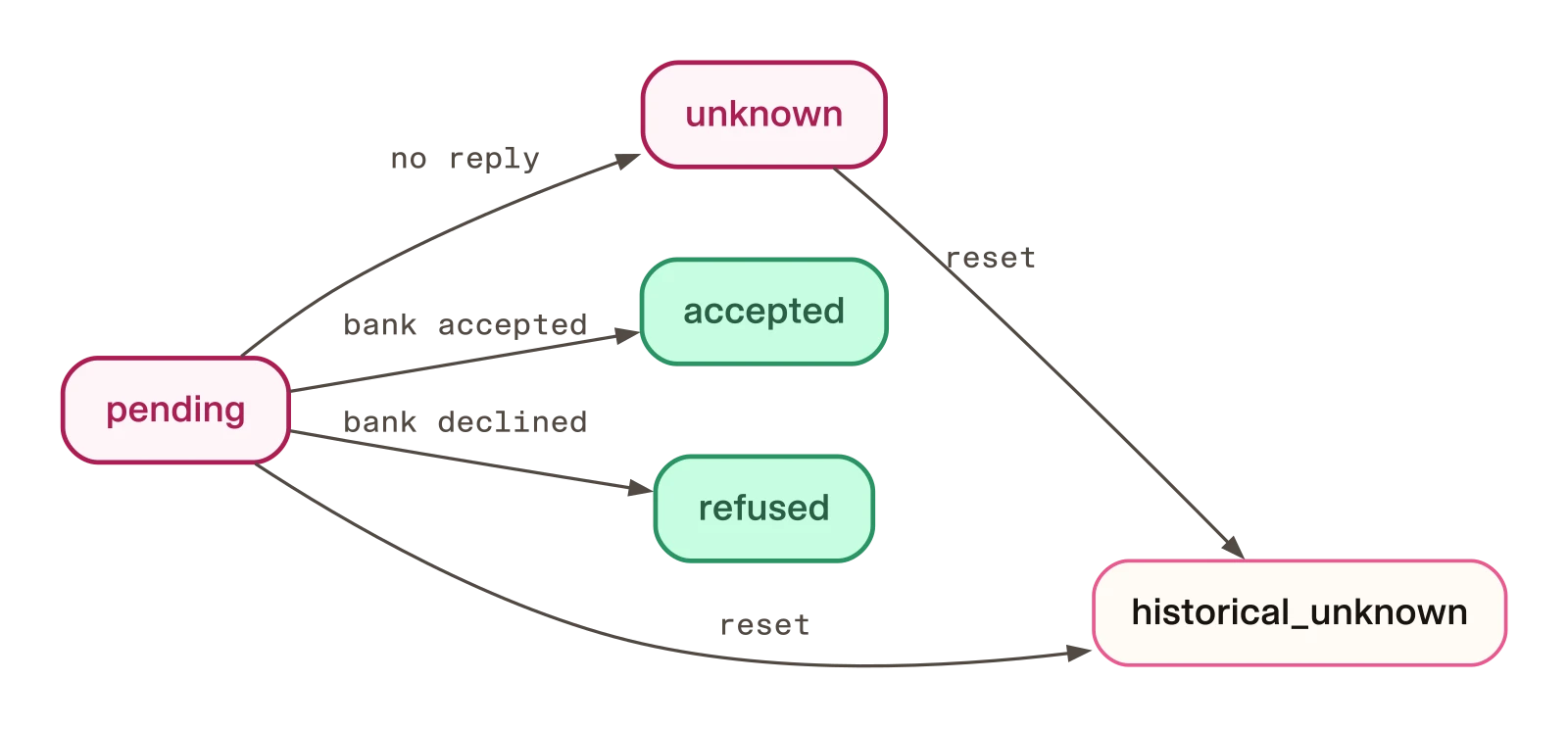
While a marker is pending or unknown, the journal holds the caller and refuses a second marker (premier_demo/host.py, lines 106 to 121). A reset turns both of those into historical_unknown and starts a new epoch (lines 131 to 149).
Now ask for a new transfer. In the recorded run this was about four minutes later, and your verification will also have run out by then, which Step 8 uses:
You: Move 25 dollars from checking to bills.
Assistant: The earlier transfer outcome is unknown. Do not retry. Check the original transfer status.
Then stop the server and start it again, without the fault, with DEMO_SEED=0 make run. A restart wipes the process’s memory, but not the journal, which the README says is durable and lives in var/private/ (README.md, lines 309 to 311). In the recorded run, the first request after the restart got the same sentence:
You: Move 25 dollars from checking to bills.
Assistant: The earlier transfer outcome is unknown. Do not retry. Check the original transfer status.
The tool log shows why. The review tool returned refused with the reason outcome_unresolved. The host raises that reason when the journal holds an unknown or pending outcome (premier_demo/host.py, lines 312 and 313). The adapter maps it to the unknown sentence (premier_demo/rasa_adapter.py, lines 148 and 149).
When the host gives a different reason, the adapter also asks whether an earlier outcome is unresolved before it chooses words. The function _unresolved answers (premier_demo/rasa_adapter.py, lines 161 to 177). If this process already knows that the last submit was unknown, it answers yes at once, without reading anything. Otherwise it reads the retained status through the host. New-request advice is allowed only after a successful read of a recognized, resolved state. If the read fails, or the state is unknown, pending, or unrecognized, it assumes the worst.
Run the test for the lost reply on its own, and the one for the journal surviving a restart:
uv run --locked --group models python -m unittest discover -s tests -v -k test_a_lost_reply_is_unknown_and_never_resent
uv run --locked --group models python -m unittest discover -s tests -v -k test_unknown_outcome_holds_the_principal_across_sessions_and_restart
test_a_lost_reply_is_unknown_and_never_resent (test_flow.LostReply.test_a_lost_reply_is_unknown_and_never_resent) ... ok
----------------------------------------------------------------------
Ran 1 test in 0.713s
OK
exit status: 0
test_unknown_outcome_holds_the_principal_across_sessions_and_restart (test_flow.HostTests.test_unknown_outcome_holds_the_principal_across_sessions_and_restart) ... ok
test_unknown_outcome_holds_the_principal_across_sessions_and_restart (test_host_ci.HostWithoutVendorFile.test_unknown_outcome_holds_the_principal_across_sessions_and_restart) ... ok
----------------------------------------------------------------------
Ran 2 tests in 0.744s
OK
exit status: 0The first test asserts that a lost reply raises an unknown outcome and that the mock saw exactly one transfer. The second sends a transfer with a lost reply and opens a new session. It closes and reopens the journal as a restart does. It asserts that the review is refused and the principal is still held. The output is the complete output of two separate runs at the same commit, saved in the single-test runs. The second test appears twice because a vendor-free copy of the host tests also runs it.
Checkpoint: the unknown sentence after the first confirm, after a new request, and after a restart. The journal holds one unknown marker.
Step 8. Which “no” wins?
Predict before you check.
After step 7, the outcome is unknown, and you have not reset anything. Wait more than a minute after your last “Verify me.”, so the verification expires. Then ask for a new transfer. Two reasons now apply: the verification is expired and an earlier outcome is unknown. Which sentence does the caller hear?
The answer is the unknown sentence. The tool log of the lost-reply run from step 7 shows both reasons at once. The review tool ran about five minutes after verification (06:55:56, then 07:00:47). It returned {"state": "refused", "reason": "assurance_required"}, meaning the verification had expired. The caller heard The earlier transfer outcome is unknown. Do not retry. Check the original transfer status.
The code is a short check at the end of the review path (premier_demo/rasa_adapter.py, lines 298 to 307):
    if result.get("state") == "refused":
        # No review was made: the host says so, so no retry advice is improvised. An
        # unknown earlier outcome outranks every other reason (a stale verification
        # may be checked first), so the retained status is read before any advice.
        reason = result.get("reason")
        text = _review_refusal_text(reason)
        if reason != "outcome_unresolved" and await _unresolved(host):
            text = UNKNOWN_OUTCOME_TEXT
        await deliver_reply(context, text)
    return ToolResult(llm_response=_safe(result))
When a review is refused, the adapter checks the reason. For any reason other than an unresolved outcome, it asks _unresolved before choosing words. If the answer is yes, the unknown sentence wins. When the reason is already an unresolved outcome, the unknown sentence is chosen directly. When the review step itself fails with an error, the adapter does not read the retained status. It speaks the fixed “transfer review is unavailable” sentence (premier_demo/rasa_adapter.py, lines 263 to 265). Precedence is established for refused reviews, not for every path.
After the restart, the caller again heard the unknown sentence with verification about 80 seconds old. The tool-call log records 80.7 seconds; the typed-run log records 81.5 seconds. In that final turn the model did not call a banking tool. The receipts show the reply the caller heard. They do not show who delivered it or the path behind it.
Why does this matter? “Say verify me and ask again” is the advice the expired sentence gives. After a lost reply the README says retrying could submit the transfer twice (README.md, lines 309 to 311), so the unknown sentence has to come first. A test pins this precedence. Run it on its own:
uv run --locked --group models python -m unittest discover -s tests -v -k test_an_unknown_earlier_outcome_outranks_an_expired_verificationtest_an_unknown_earlier_outcome_outranks_an_expired_verification (test_reply_adapter.ReplyAdapterTests.test_an_unknown_earlier_outcome_outranks_an_expired_verification) ... ok
----------------------------------------------------------------------
Ran 1 test in 0.002s
OK
exit status: 0The test sets the host’s review reply to assurance_required and the retained status to unknown. It checks that the caller hears no retry advice or request to ask again (tests/test_reply_adapter.py, lines 237 to 246). That is the complete output of a separate run at the same commit, saved in the single-test runs.
Apply the rule to another refusal
Read the existing test in tests/test_reply_adapter.py, lines 237 to 246, then apply the adapter code above to this different input:
| Source-reading case | Value |
|---|---|
| Review result | state: refused, reason: account_unavailable |
| Retained transfer status | unknown |
Work out the exact sentence the caller should hear before opening the answer. This is a source-reading exercise; leave the checkout unchanged so the later test counts and clean-status checks keep their stated baseline.
Expected reply for the different refusal
The caller should hear The earlier transfer outcome is unknown. Do not retry. Check the original transfer status.
The refusal reason now describes an unavailable account, rather than expired verification. The adapter initially selects the outside-scope sentence, then reads the retained status on this refused-review path. An unknown outcome replaces that sentence with the unknown-outcome reply (premier_demo/rasa_adapter.py, lines 298 to 307). This is a proposed input for reading the source, distinct from the recorded expired-verification test above.
Step 9. Start over without pretending
A lost outcome stays unknown. It is not failed and not successful. But a fictional exercise needs a way to move on. Stop the server first, because the command needs the journal’s exclusive lock and a running server makes it refuse. Then run:
uv run --locked python -m premier_demo.reset_fixture --reason "starting over" --acknowledge-unresolvedThe recorded run exited with status 0 and printed:
New fictional exercise started (epoch 2); the audit row was written.The flag --acknowledge-unresolved is required. It is how you say, in the command itself, that you understand the old outcome remains unresolved (premier_demo/reset_fixture.py, lines 17 to 33). The reset writes an audit row with your reason, a hash of the prior journal, and the old and new epochs. It marks the open markers as historical_unknown (premier_demo/host.py, lines 131 to 149). The code comment says it never says the old effect failed or succeeded (lines 141 and 142), and it never authorizes resending it.
Start the assistant again with DEMO_SEED=0 make run. In the recorded run, the journal now read historical_unknown for the old row and accepted for the new one, and the same request worked:
You: Verify me.
Assistant: Your simulated verification was refreshed. It lasts about a minute.
You: Move 25 dollars from checking to bills.
Assistant: Review: transfer USD 25.00 from checking-A to bills-A. To submit exactly this transfer, say confirm transfer next. Anything else cancels this review.
You: Confirm transfer.
Assistant: The transfer request was accepted. Accepted does not mean posted.
“Accepted” means the mock took the request. The README says it does not mean a bank has posted anything (README.md, line 263). The saved receipts disagree about the epoch. The reset output reports epoch 2, but the saved journal rows label the accepted row as epoch 1. These receipts show an accepted reply after restart. The accepted row’s epoch membership remains unresolved in these receipts. The reset does not authorize retrying the original transfer.
A test checks the reset. It runs the lost-reply flow and shows that a reset is refused while the backend holds the journal. After a reset, it checks the old row is historical_unknown and one audit row exists. It also checks the old session is stale in the new epoch:
uv run --locked --group models python -m unittest discover -s tests -v -k test_reset_fixture_audits_and_keeps_the_old_unknown_in_historytest_reset_fixture_audits_and_keeps_the_old_unknown_in_history (test_flow.HostTests.test_reset_fixture_audits_and_keeps_the_old_unknown_in_history) ... ok
test_reset_fixture_audits_and_keeps_the_old_unknown_in_history (test_host_ci.HostWithoutVendorFile.test_reset_fixture_audits_and_keeps_the_old_unknown_in_history) ... ok
----------------------------------------------------------------------
Ran 2 tests in 0.737s
OK
exit status: 0That is the complete output of a separate run at the same commit, saved in the single-test runs.
Checkpoint: the reset prints the epoch line, and the new transfer is accepted.
Step 10. Find out which test stops a second send
The rule behind step 7 is that an unknown outcome blocks every later transfer for that caller. The example enforces it in two places in premier_demo/host.py. The review-time hold refuses to make a review while the journal holds an unknown or pending outcome (lines 312 and 313):
            if self.journal.held(context.principal):
                raise Refused("outcome_unresolved")
The send-time hold is in Journal.mark_pending, called just before the send. It refuses to open a second marker while one is open (lines 106 to 121). The comment in the source calls this “one atomic statement”. The code is an atomic transaction: it begins an immediate transaction, checks held, inserts the marker, and commits, or rolls back:
    def held(self, principal: str) -> bool:
        row = self._db.execute("SELECT 1 FROM marker WHERE principal=? AND state IN ('pending','unknown')",
                               (principal,)).fetchone()
        return row is not None

    def mark_pending(self, principal: str, review: str, epoch: int) -> None:
        # One atomic statement: refuses when any open marker exists.
        self._db.execute("BEGIN IMMEDIATE")
        try:
            if self.held(principal):
                raise Refused("outcome_unresolved")
            self._db.execute("INSERT INTO marker VALUES(?,?,'pending',?)", (principal, review, epoch))
            self._db.execute("COMMIT")
        except BaseException:
            self._db.execute("ROLLBACK")
            raise
The two holds are different. The first stops a new review. The second stops a send. Suppose two reviews are open, and the first is sent and its reply lost. The second review predates the unknown outcome, so only the send-time hold can stop it.
Two more pieces help: the adapter puts the unknown sentence first (lines 298 to 307 of premier_demo/rasa_adapter.py) and re-reads the journal after a restart (lines 161 to 177).
Remove one guard at a time
We removed each guard in turn and ran the whole suite. The script that does this, mutate.py, is in the receipt files. It writes each changed version of the files in turn, runs the suite, and puts the original files back when it finishes. The results file lists the failing tests for every row. That summary comes from the raw results generated by the script. The receipts also include:
- The 154-test results.
- The 158-test results.
- A derived count of distinct failing test names.
- Path-redacted copies of the per-mutation logs, described in the receipt notes.
The send-time hold’s removal is this change, which deletes two lines inside mark_pending (lines 115 and 116):
         try:
-            if self.held(principal):
-                raise Refused("outcome_unresolved")
             self._db.execute("INSERT INTO marker VALUES(?,?,'pending',?)", (principal, review, epoch))
All 154 tests pass before any change, with the official ZIP in place and no skips. The count below is the number of distinct failing test names. A 0 means no test noticed.
| What we removed | Tests that fail (154 tests) |
|---|---|
The review-time hold (PremierService.review_transfer) | 1 |
The send-time hold (Journal.mark_pending) | 0 |
The journal stops holding after an unknown (Journal.held) | 1 |
| Both host holds | 1 |
| The unknown-first wording rule (adapter) | 1 |
| The journal status after a restart (adapter) | 3 |
| Every hold and both wording rules | 4 |
Look at the second row. You can delete the lines that refuse a second marker, and all 154 tests still pass. Deleting both host holds fails only the one test for the review-time hold. Nothing pinned the send-time hold: a review made before the unknown outcome could still be confirmed and sent after it, and the suite would stay green.
Add the missing tests
We added two tests to tests/test_flow.py, in the HostTests class after test_unknown_outcome_holds_the_principal_across_sessions_and_restart. They were merged into RasaHQ/rasa-community-resources in pull request 255 at commit 0e90ad8f3083c697d000913b9d4a54cf559a87c9, after the revision this tutorial’s recorded runs used. In that pull request nothing under premier_demo/ changed. This is the code, as in the diff:
    def test_the_journal_refuses_a_second_marker_while_an_outcome_is_unknown(self):
        # The send-time hold on its own: no service and no review, only the journal's rule.
        self.build()
        self.journal.mark_pending("demo-A", "first", self.journal.epoch)
        self.journal.settle("first", "unknown")
        with self.assertRaises(Refused):
            self.journal.mark_pending("demo-A", "second", self.journal.epoch)

    def test_a_review_made_before_an_unknown_outcome_cannot_be_sent_after_it(self):
        # Two reviews are open. The first is sent and its reply is lost. The second was made
        # before that, so the review-time hold cannot stop it; only the send-time hold can.
        context = self.build(fault="transfer-response-lost")
        first = self.review(context)
        second = self.review(context, "7.00")
        self.service.confirm(context, first["review"], self.exact(first))
        self.assertEqual(self.service.submit(context, first["review"])["state"], "unknown")
        self.service.confirm(context, second["review"], self.exact(second))
        with self.assertRaises(Refused):
            self.service.submit(context, second["review"])
        self.assertEqual(self.fx.mock.transfers, 1)
The first checks the journal rule on its own: it marks a transfer pending, settles it as unknown, and checks that a second marker is refused. The second opens two reviews, sends the first with its reply lost, then confirms the second, and checks that it cannot be sent and that the mock saw one transfer.
These two tests are not in the commit this tutorial pinned, so a Codespace opened at that commit does not have them. Add them first, from the merge commit of pull request 255, with the same command that Try it yourself uses below:
git checkout 0e90ad8f3083c697d000913b9d4a54cf559a87c9 -- tests/test_flow.pyThen run each on its own. Check that each run names the test and prints Ran 1 test or Ran 2 tests. If a run prints Ran 0 tests, the test was not selected, and that is not a pass:
uv run --locked --group models python -m unittest discover -s tests -v -k test_the_journal_refuses_a_second_marker_while_an_outcome_is_unknown
uv run --locked --group models python -m unittest discover -s tests -v -k test_a_review_made_before_an_unknown_outcome_cannot_be_sent_after_it
test_the_journal_refuses_a_second_marker_while_an_outcome_is_unknown (test_flow.HostTests.test_the_journal_refuses_a_second_marker_while_an_outcome_is_unknown) ... ok
test_the_journal_refuses_a_second_marker_while_an_outcome_is_unknown (test_host_ci.HostWithoutVendorFile.test_the_journal_refuses_a_second_marker_while_an_outcome_is_unknown) ... ok
----------------------------------------------------------------------
Ran 2 tests in 0.738s
OK
exit status: 0
test_a_review_made_before_an_unknown_outcome_cannot_be_sent_after_it (test_flow.HostTests.test_a_review_made_before_an_unknown_outcome_cannot_be_sent_after_it) ... ok
test_a_review_made_before_an_unknown_outcome_cannot_be_sent_after_it (test_host_ci.HostWithoutVendorFile.test_a_review_made_before_an_unknown_outcome_cannot_be_sent_after_it) ... ok
----------------------------------------------------------------------
Ran 2 tests in 0.732s
OK
exit status: 0That is the complete output of two separate runs at the same commit with the two tests added, saved in the single-test runs. With them, the suite has 158 tests, and the same removals give these counts:
| What we removed | Tests that fail (154 tests) | Tests that fail (158 tests, with the two new tests) |
|---|---|---|
| The review-time hold | 1 | 1 |
| The send-time hold | 0 | 2 |
| The journal stops holding after an unknown | 1 | 3 |
| Both host holds | 1 | 3 |
| The unknown-first wording rule | 1 | 1 |
| The journal status after a restart | 3 | 3 |
| Every hold and both wording rules | 4 | 6 |
Every row now fails at least one test, including the send-time hold.
Repeat the recorded baseline test. If you opened the Codespace at the recorded commit in Step 1, you already have the revision used for these runs. If you installed the two new tests in the section above, put the pinned test file back first, so that this run starts from the 154-test baseline:
git checkout 84a145aae7360e7d8d8b4d6db6ec05ca7bee6104 -- tests/test_flow.py
git status --short
The restoration commands above are suggested preparation, not a recorded Codespace check. Do not proceed if git status --short lists a change you cannot account for. Then, in the example’s folder, run:
make testIn a Codespace at this commit, make test ran 154 tests and all passed, in about 72 seconds. What we kept is a partial tail, the last lines of that run, in the same pinned-route receipt. It is not the complete log of that run.
Optional: repeat the removals yourself
In premier_demo/host.py, delete the two lines inside mark_pending that refuse when self.held(principal) is true (lines 115 and 116), and run make test again. All 154 tests still pass: nothing notices. Restore the file:
git checkout -- premier_demo/host.pyNow add only the two new tests, by taking tests/test_flow.py from the merge commit of pull request 255:
git checkout 0e90ad8f3083c697d000913b9d4a54cf559a87c9 -- tests/test_flow.py
make test
Expect 158 tests and no failures with the original code. Delete the same two lines again and run make test: the two new tests fail (test_the_journal_refuses_a_second_marker_while_an_outcome_is_unknown and test_a_review_made_before_an_unknown_outcome_cannot_be_sent_after_it). If you see any other result, check that you deleted both lines and nothing else in mark_pending. When you are done, put both files back:
git checkout 84a145aae7360e7d8d8b4d6db6ec05ca7bee6104 -- tests/test_flow.py premier_demo/host.pyThe example also has a separate offline component proof, run on November 17, 2026 at this commit. Three test suites (tests.test_reply_adapter, tests.test_flow, and tests.test_demo_data) ran 57 tests in 18.818 seconds with no skips, on the locked Rasa 3.21.0.dev5 wheel. It is a different run from the 154 tests above and from the typed conversations, and it does not include the two tests from pull request 255. It does not show a trained agent, a model, a voice call, a vendor, or a bank. The component proof receipt lists its decisive tests and these limits, and the execution record holds the exact command.
What is specific here is the finding: the rule that stops a second send had no test of its own.
Stop and clean up
Click the terminal running the server and press Ctrl+C, including on a Mac. The server stops. Ctrl+C stops the application, not the Codespace.
Before you delete the Codespace, keep what you need:
- your notes, and the table or results you recorded;
- any source change you made, such as a deleted line from the optional section;
- the seed line you wrote down;
- the audit history, if you ran the reset in Step 9: the reset writes an audit row and keeps the old unknown outcome in history (
README.md, line 372); - the journal, if you want to keep it. It lives in
var/private/and holds a caller, an opaque review id, a state, and an epoch, and no amount, account, or transcript (README.md, lines 311 and 499). Copy it to private storage. Do not delete the journal to clear a hold (README.md, line 273).
The README asks you to save or commit appropriate work first, and never to commit secrets or vendor files (README.md, lines 197 to 206). Keep the Fiserv ZIP somewhere private. Do not put it in a public repository or in anything you share.
Then open your Codespaces and stop or delete this one. Stopping a Codespace ends its compute usage, but the storage it keeps still counts toward your storage usage. Deleting it removes its local files, including the uploaded ZIP and the demo journal (README.md, lines 197 to 206).
Recap
- Refused means not carried out: never sent, or sent and declined by the bank. Unknown means you cannot tell. Expired means, in the recorded run, that the verification ran out before a review was made, so nothing was reviewed. The host checks again before it sends (
premier_demo/host.py, lines 218 to 226 and 244 to 250); we did not record that case. - For outside scope, expired verification, a bank decline, and the lost reply, the tool log shows the host’s review or submit call. In those recorded turns, the caller heard a sentence the host wrote. The restart turn, about 80 seconds after the verification, had no tool call, so the receipts do not show who delivered it. The other fixed sentences in step 3 are read from the code.
- The host writes the journal row before the send. A lost reply stays
unknown, is never resent, and survives a restart. - In the refused-review path, an unknown outcome outranks the other reasons. In the recorded run, an expired verification and an unknown outcome applied at once, and the caller heard the unknown sentence. A review that fails with an error does not check it.
- A reset starts a new fictional exercise and keeps the old outcome as
historical_unknown. It never says the old transfer failed or succeeded. - Before two added tests, you could delete the send-time hold, and all 154 tests still passed. Removing a rule on purpose is how you find out which ones nothing pins.