

Guide · Platform / operations engineer
How to set the model API key in Rasa endpoints.yml
Give every Rasa model group its API key through an environment variable placeholder, then start the server once against the real provider before you deploy.
Exit 1
the sample agent stopped at startup with the old key setting and the health check on
One line
the change that let the same agent start and answer
Key takeaways (3)
- Write each model key as an environment variable placeholder, in both config files.
- A setting Rasa does not read in that file can travel to the provider, and the provider may refuse it.
- Before you deploy, start the server once with the health check on and the real key.
You turned on Rasa’s startup health check, and now your server will not
start. The log blames a model setting in endpoints.yml. The setting looks
like this:
api_key_env: OPENAI_API_KEYThe fix is one line per model group. Write the key as api_key with an
environment variable placeholder:
   - id: openai-llm
     models:
       - provider: openai
         model: gpt-5.2
-        api_key_env: OPENAI_API_KEY
+        api_key: ${OPENAI_API_KEY}
         temperature: 0.0
This matters because the old line looks harmless until a check or a provider reads it. On Rasa Pro 3.20.0, it passed training and stopped the server only when the health check was on. Newer Rasa prereleases refuse it. The placeholder form works on 3.20.0, and it is the form the newer prereleases ask for.
Here is what the server logged at startup on Rasa Pro 3.20.0, with the old line, against the real OpenAI API. This is an excerpt, trimmed and re-wrapped to fit:
ERROR  Test call to the LLM API failed for component -
       ContextualResponseRephraser.
       [...] litellm.BadRequestError: OpenAIException -
       Unknown parameter: 'api_key_env'.
The process then exited with code 1. If you searched for
Unknown parameter: 'api_key_env'., this guide is about that error.
Show the full log line, unedited
2026-09-29 11:50:21 ERROR rasa.core.run - {"event_info": "Test call to the LLM API failed for component - ContextualResponseRephraser.", "config": {"model": "gpt-5.2", "api_base": null, "api_version": null, "api_type": "openai", "provider": "openai", "reasoning_effort": "none", "temperature": 0.0, "max_completion_tokens": 256, "timeout": 5, "api_key_env": "OPENAI_API_KEY"}, "error": "ProviderClientAPIException(\"\\nOriginal error: litellm.BadRequestError: OpenAIException - Unknown parameter: 'api_key_env'.)\")", "event": "contextual_response_rephraser.init.send_test_llm_api_request_failed", "level": "error"}Why the old line breaks
A model group is a named entry in your YAML that says which provider, model and key to use. A Rasa project can have model groups in two files.
integrations.ymlholds the orchestrator’s group. The orchestrator is the model that runs each conversation in Rasa Mantle, the agent runtime in therasa-propackage.endpoints.ymlholds groups for other parts of Rasa. In the sample voice agent, itsnlgsection names one of them for Rasa’s response rephraser. In this sample on 3.20.0, that group was used only by the startup test request.
This is an excerpt of the sample’s endpoints.yml, with the comments cut:
nlg:
  type: rephrase
  llm:
    model_group: openai-llm
On Rasa Pro 3.20.0, only the Mantle client for integrations.yml read
api_key_env. It looked up the named variable and turned it into the key.
The endpoints.yml path did not know the setting. It kept every setting it
did not recognise and passed them on to the provider as request parameters.
That is the general rule on that path: if you added any other custom setting
to an endpoints.yml model group, check it too.
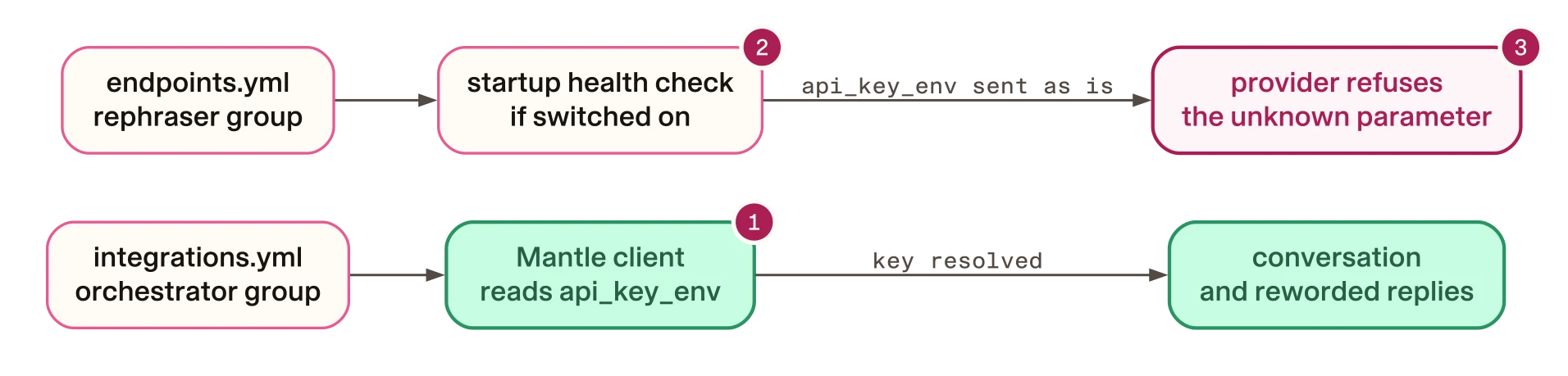
- In
integrations.yml, Mantle turned the variable name into the key. - In this sample on 3.20.0, the
endpoints.ymlgroup was sent only by the startup test request. - OpenAI and Anthropic both refused the request, and the server stopped.
So the request to OpenAI carried a parameter called api_key_env, and OpenAI
refused it. We also pointed the rephraser’s group at Anthropic and left the
line in. Anthropic refused it too, with a different message. This is an
excerpt of its error, unedited:
api_key_env: Extra inputs are not permittedRasa does check model group settings when it trains and when it loads a
model. On 3.20.0 it checks the names it knows. For example, api_key must be
written as ${NAME}. api_key_env was not on that list, so training passed.
Why it only failed with the health check on
The health check is a test request Rasa sends to the model provider when the
server starts. You turn it on by setting the environment variable
LLM_API_HEALTH_CHECK to true. It is off by default. With it off, Rasa logs
this warning at startup, copied from the run’s log:
The LLM_API_HEALTH_CHECK environment variable is set to false, which will disable LLM health check. It is recommended to set this variable to true in production environments.With the check off, the sample agent started with the old line and answered
normally. The reworded replies did not come from the endpoints.yml group.
In our recorded turns, Mantle reworded the replies with the orchestrator’s
model, set up from integrations.yml. The
guide on Mantle’s references embedder
found the same split for embeddings.
So the old line sat unused until someone turned the check on. Then the test request carried it, the provider refused it, and the server did not start.
Here is the same sample agent in four live runs. Between rows, the rephraser’s key setting, the provider and the health check change:
| Key setting in the rephraser’s group | Provider | Health check | What happened |
|---|---|---|---|
api_key_env: OPENAI_API_KEY | OpenAI | On | Refused with “Unknown parameter”. The server exited with 1 |
api_key: ${OPENAI_API_KEY} | OpenAI | On | The test request passed. The server started and answered |
api_key_env: OPENAI_API_KEY | OpenAI | Off | The server started and answered. The line was never sent |
api_key_env: ANTHROPIC_API_KEY | Anthropic | On | Refused with “Extra inputs are not permitted”. It never started |
In the Anthropic run, the orchestrator and the training embeddings went to a local stand-in server. Only the rephraser’s test request reached Anthropic.
How to fix it
These steps change your own project. The example is the sample voice agent in the companion repository, which had the old line in both files.
The old line in the sample came from us. On 3 September 2026, a change to our
companion repository replaced api_key: ${NAME} with api_key_env: NAME in
its endpoints.yml files, because we believed the placeholder was never
expanded. On 3.20.0, the placeholder did work in endpoints.yml. The
guide to API key placeholders
covers how Rasa reads them.
Find every old line
From your project folder, list each setting that still uses the old name:
git grep -n api_key_env -- '*.yml'Check endpoints.yml and integrations.yml. If your project is not in Git,
use grep -rn api_key_env --include='*.yml' . instead.
Replace each one with a placeholder
Change every match to api_key, keep the same variable name, and wrap it in
${...}. In the sample voice agent, endpoints.yml has two groups to change.
This excerpt is from the
same file at a later companion revision,
where the change has been made:
model_groups:
  - id: openai-llm
    models:
      - provider: openai
        model: gpt-5.2
        api_key: ${OPENAI_API_KEY}
        temperature: 0.0
  - id: openai-embeddings
    models:
      - provider: openai
        model: text-embedding-3-large
        api_key: ${OPENAI_API_KEY}
Make the same change in integrations.yml. Here is an excerpt of that
revision’s file, with the comments cut:
llm:
  model_group: orchestrator

model_groups:
  - id: orchestrator
    models:
      - provider: openai
        model: gpt-5.2
        api_key: ${OPENAI_API_KEY}
        temperature: 0.0
Rasa Pro 3.20.0 still read api_key_env in integrations.yml. But the
placeholder worked there too, in a run of another sample project. Newer
prereleases refuse the old name in both files. One spelling in both files is
one rule to remember.
Put the key in the environment
The placeholder names an environment variable; it does not hold the key. Set
OPENAI_API_KEY to your real key, in the shell or in the project’s .env
file. Rasa loads the project’s .env when it starts. It does not overwrite a
variable you have already exported. The sample’s .env.example also lists
RASA_LICENSE and DEEPGRAM_API_KEY.
Never paste the key itself into the YAML file. On 3.20.0, Rasa checks that
api_key in an endpoints.yml model group is written as ${NAME}. The 3.21
prereleases check both files.
How to check the fix works
Train as usual, then start the server once with the health check on and your real key:
- macOS
LLM_API_HEALTH_CHECK=true uv run --frozen rasa run --enable-api- Linux
LLM_API_HEALTH_CHECK=true uv run --frozen rasa run --enable-api- Windows
$env:LLM_API_HEALTH_CHECK='true'; uv run --frozen rasa run --enable-api
In another terminal, ask the server for its status on Rasa’s default port:
curl -s http://localhost:5005/statusIf /status answers, the server got past the startup test request. In our
run with the old line, /status never answered: the process exited with code
1 first. With the placeholder, /status answered.
In that run we then sent “Hi there” to the sample’s REST channel. That was our extra test, not a step you need. The sample’s fictional travel agent replied:
Hi. I’m Atlas, Horizon Travel’s voice assistant. I can help with things like viewing your itinerary, checking flight status, updating a booking, or reporting lost baggage. What would you like to do?Make two checks part of your deploy: the search for the old name, and the start with the health check on. In CI, fail the build if the old name comes back:
if git grep -n api_key_env -- '*.yml'; then
  echo "Replace api_key_env with api_key: \${NAME}" >&2
  exit 1
fi
Then treat the health-check start as a gate before each deploy. In this
sample on 3.20.0, it was the only step that sent the endpoints.yml group to
the real provider.
Should you leave the health check on?
The check sends a real model request each time the server starts. In the sample, that was one request per start. In return, a key setting the provider refuses stops the server at startup, before any customer reaches it.
Rasa’s own warning recommends turning it on in production. If you keep it off to save that request, still run the check above once before each deploy.
Newer Rasa versions
This guide was tested on Rasa Pro 3.20.0. As of 2 October 2026, the site targets the 3.21.0.dev5 prerelease. We read its source but did not run this sample on it.
In 3.21.0.dev5, Rasa refuses api_key_env in a model group
in either file. The message ends with the
fix:
which is no longer supported. Replace it with 'api_key: ${ENV_VAR_NAME}'.That is the end of the message, copied from the source. The placeholder form in this guide is the form that release asks for.
We did not test the latest stable release, 3.20.1.
Limits
- Every run in the table used one sample voice agent, on Rasa Pro 3.20.0, on 29 September 2026. Each row in the table is one run.
- We read the code path for OpenAI and for the default client Rasa uses for providers such as Anthropic. Azure, self-hosted and Rasa-hosted clients, and groups with several models, were not checked.
- We did not test a Gemini key.
- The behaviour of the 3.21 prereleases comes from reading their source.