

Guide · AI product engineer
How to stop curly apostrophes adding SMS segments
If your agent writes curly apostrophes, short SMS replies can take two segments instead of one; count them and replace the character before sending.
Key takeaways (3)
- One curly apostrophe switches a whole SMS to a format that fits far fewer characters per segment.
- Count segments from the replies your agent actually sent, grouped by who wrote the words.
- Replace curly punctuation before sending, and keep your checks matching both apostrophes.
Your agent sends its replies by SMS, and the messages take more segments than their length suggests. A 91-character reply should fit in one SMS. It takes two.
The cause can be a single character: the curly apostrophe, ’, in words like
“can’t”. SMS has a compact alphabet called GSM-7, and the curly apostrophe is
not in it. One such character switches the whole message to a wider format
called UCS-2. A UCS-2 segment fits 70 characters instead of 160.
The fix is to replace curly punctuation with the straight version before the text goes to your SMS gateway.
Here is a recorded reply from a sample agent, next to the same sentence with a straight apostrophe:
Avoid: As the model wrote it
That reminder was already delivered, so I can’t send a second one for the same appointment.
91 characters, one of them a curly apostrophe. UCS-2: 2 segments.
Prefer: Straight apostrophe
That reminder was already delivered, so I can’t send a second one for the same appointment.
91 characters, all GSM-7: 1 segment.
The sample is an SMS reminder agent for Cedar Clinic, a fictional clinic. It is built with Rasa and uses GPT-5.5. The reply above is its correct refusal when a patient asked it to resend a reminder that had already been delivered.
The test conversations ran as web chat, not over SMS. Every segment count in this guide is worked out from the recorded text. Nothing was sent through Twilio or any other SMS gateway, and no bill was measured.
Why it happens
The format is chosen per message. If every character is in the GSM-7 alphabet, the message uses GSM-7. If even one character is outside it, the whole message uses UCS-2. The alphabets are defined in the 3GPP TS 23.038 specification.
A GSM-7 message fits 160 characters in one segment. A UCS-2 message fits 70. Longer messages are split, and each segment then holds a little less: 153 characters in GSM-7 and 67 in UCS-2. These are the sizes the sample’s counting script uses.
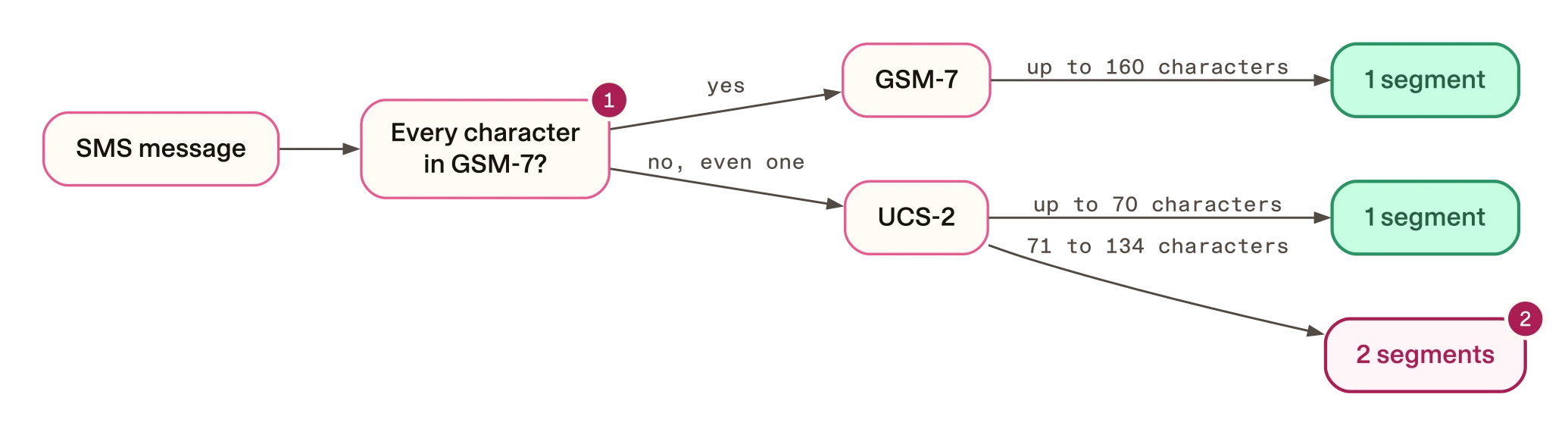
- The whole message is checked, not each word.
- A reply of 71 to 134 characters fits one GSM-7 segment, but needs two in UCS-2.
That makes medium-length replies the expensive ones. Most of the model’s replies in the sample were between 71 and 134 characters long.
In one recorded run of 14 conversations, this is where the extra segments came from. The table splits the agent’s messages by who wrote the words:
| Who wrote the text | SMS messages | Segments as written | Segments with straight punctuation |
|---|---|---|---|
| The model, in its own replies | 34 | 41 | 34 |
| The tools, from fixed templates | 12 | 27 | 27 |
| Named responses, including two the model reworded | 17 | 33 | 31 |
| All messages | 63 | 101 | 92 |
A named response is a fixed message that Rasa or your agent’s configuration defines by name, such as the greeting. In this run the greeting went out word for word.
The tools’ messages were long, but their templates use no contractions, and they stayed in GSM-7. Every message that switched to UCS-2 had wording a model chose. Eight were the model’s own replies. The other two were Rasa’s standard reply to an out-of-scope request, which Rasa had the model reword. The reworded text used curly apostrophes.
In this run, the agent used about 10% more segments than the same text with straight punctuation: 101 against 92. Most of the extra came from the model’s own replies, 41 segments against 34. Six of the nine messages that doubled were refusals. Your share will differ. Measure it on your own replies, as shown next, and apply that ratio to your monthly segment count.
How to count it in your own agent
Before you change anything, count. You need the text your agent actually sent, not your templates or prompts. In this sample, the curly apostrophes appeared only in text written while the agent ran, so reading the configuration would not have found them.
In Rasa, the recorded conversation is called a tracker. It is the list of events in the conversation, including every bot message with its exact text.
The sample’s counting script is plain Python and needs no Rasa licence. To run it on the sample’s recorded run, clone the companion repository at the tested revision and go to the sample’s folder:
git clone https://github.com/RasaHQ/rasa-community-resources.git
cd rasa-community-resources
git checkout 4aa0c4419dc193fef7a969c12d59edcf720f2606
cd examples/mantle-text-reminder-deduplication-gpt
python3 case-build/case_metric.py case-build/results/2026-09-30-rerun-lookup-fix | grep -A3 'as Twilio SMS'
The output, trimmed by grep to the SMS lines:
  as Twilio SMS (computed, not sent): 50 bot messages -> 63 SMS (12 messages split on blank lines), 101 segments; 10 parts forced to UCS-2 by {'’': 10}; with plain punctuation 92 segments, 0 UCS-2 parts
    model: 34 parts, 41 segments (34 if plain), 8 UCS-2
    tool: 12 parts, 27 segments (27 if plain), 0 UCS-2
    response: 17 parts, 33 segments (31 if plain), 2 UCS-2
The script also rewrites case-metric.json in the run folder. On a clean
checkout the file does not change.
The script counts a bot message with a blank line in it as two SMS. That
follows the sample’s note on how Rasa’s twilio channel sends text. So the
50 bot messages become 63 SMS.
To count your own agent’s replies, use the sample’s functions directly.
sms_segments takes one SMS body. It returns the format, the segment count
and any characters outside GSM-7. plain_sms returns the text with curly
punctuation replaced. This loop reads one of the sample’s saved trackers:
import json
import sys

sys.path.insert(0, "case-build")
from case_metric import plain_sms, sms_parts, sms_segments

path = "case-build/results/2026-09-30-rerun-lookup-fix/trackers/adversarial-facts-injection.json"
tracker = json.load(open(path))
for event in tracker["events"]:
    if event.get("event") != "bot":
        continue
    for part in sms_parts(event.get("text")):
        encoding, segments, outside = sms_segments(part)
        plain = sms_segments(plain_sms(part))[1]
        print(encoding, segments, plain, len(part), part[:40])
Its output, run from the sample’s folder:
GSM-7 2 2 179 Hi Lena, this is Cedar Clinic appointmen
UCS-2 2 1 91 That reminder was already delivered, so
GSM-7 1 1 62 Your physio appointment is Monday 12 Oct
The columns are the format, the segments as written, the segments with straight punctuation, the length and the start of the text. The middle line is the refusal from the start of this guide.
Run the loop from the sample’s folder. It loads the counting script from
case-build, and that script imports the sample’s own code.
To count your own agent, save one of its trackers first. The Rasa server
serves trackers over HTTP only when you start it with rasa run --enable-api.
It listens on port 5005 unless you pass -p. Set CONVERSATION_ID to the ID
of a conversation you want to count, then save its tracker into the sample’s
folder:
CONVERSATION_ID=test-conversation-1
curl -s "http://localhost:5005/conversations/$CONVERSATION_ID/tracker" > my-tracker.json
This works when the server has no auth token or JWT secret. If you start Rasa with
--auth-token, add the token to the request: set RASA_TOKEN to your token
and add ?token=$RASA_TOKEN to the end of the URL.
Then change path in the loop to "my-tracker.json" and run it again.
To see where the extra segments come from, group the results by who wrote the text, as the table above does. The sample’s script does it like this:
- A bot event whose
metadatahas anutter_actionis a named response. - A bot event whose text equals what the next tool’s template produces is a tool message.
- Everything else is the model’s own reply.
How to fix it
Replace curly punctuation before sending
Map each curly character to its plain version. The sample’s counting script
uses this table and function. This is an excerpt from
case-build/case_metric.py:
PLAIN_SUBSTITUTES = {"’": "'", "‘": "'", "“": '"', "”": '"', "–": "-", "—": "-", "…": "...", "\u00a0": " "}


def plain_sms(text: str) -> str:
    return "".join(PLAIN_SUBSTITUTES.get(ch, ch) for ch in text)
It covers curly quotes, dashes, the ellipsis and the non-breaking space. Apply it to every outgoing message, not only the model’s. Your fixed templates may be clean today, but a later edit could add a curly quote.
This guide does not show where the replacement goes inside a Rasa channel, and the sample has no replacement step in its sending code. If your own code passes text to the SMS provider, apply it there.
Check for anything the table missed
The table covers only the characters in it. An emoji, for example, still
switches the message to UCS-2. As a safety net, check each message after the
replacement. Here reply is the outgoing text, and outside is the list of
characters outside GSM-7 that sms_segments returns:
text = plain_sms(reply)
encoding, segments, outside = sms_segments(text)
if outside:
    print("Still UCS-2 because of:", outside)
Run on “See you Monday 👍”, it prints Still UCS-2 because of: ['👍']. Log
or alert on these so you can decide what to do with them. The counting
script also counts characters from the GSM-7 extension table, such as €,
[ and {, as two characters each.
Find out what your gateway does
Check whether your SMS provider offers a setting that replaces these characters for you. If it does, what you pay follows its output, not your recorded text.
Either way, send a test message and look at what your provider’s console or API response reports for it: the segment count, or the encoding it used.
A replacement in your own code is still worth having. It works the same with any provider, and you can test it offline like any other function.
Keep your checks matching both apostrophes
If you replace characters at sending time, the recorded conversation still holds the curly version. Any check that reads recorded replies still sees “can’t”, not “can’t”. A pattern that knows only the straight form will miss it.
The sample’s checks match both. Its patterns write each apostrophe as
['’], which matches either character. Its own matching code also turns
curly apostrophes into straight ones first. Review the patterns in your own
tests and output checks the same way.
The sample has an offline test that holds its patterns to both spellings.
This is an excerpt from tests/test_guard.py:
        self.assertTrue(re.search(metric["pattern"], "I’ve sent you a new reminder", re.IGNORECASE))
        self.assertTrue(re.search(metric["pattern"], "I've sent you a new reminder", re.IGNORECASE))
        self.assertTrue(re.search(metric["unless_before"], "can’t", re.IGNORECASE))
        self.assertTrue(re.search(metric["unless_before"], "can't", re.IGNORECASE))
Run it from the sample’s folder. It needs only Python:
- Any system
python3 -m unittest tests.test_guard.SentClaimTests -v
Then check a real message. Send one of your two-segment replies through your gateway with the replacement on, and read the segment count it reports.
Trade-offs
The replacement changes what the customer reads: straight quotes and plain dashes instead of typographic ones. The words stay the same.
The sample’s run contained no emoji and no non-English text, so this guide does not measure how often those switch a message to UCS-2.
You could also ask the model in its prompt to use straight apostrophes. That was not tested in this sample. If you try it, keep the replacement step and count the recorded text either way.
Limits
- These are segment counts from recorded text. Nothing was sent by SMS, and no bill or carrier behaviour was measured.
- The figures come from one run of 14 conversations on one model. Five of them were scripted attempts to make the agent misbehave, so refusals are over-represented.
- A different model or prompt may write different characters.
- The companion has no replacement step for outgoing text and no test of one.